Participant
March 29, 2013
Question

How do I create a random non repeating pattern?

  • March 29, 2013
  • 5 replies
  • 71270 views

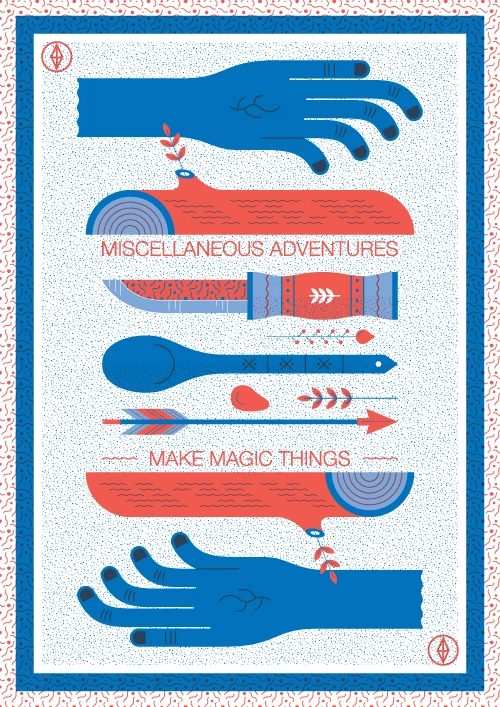
I want to create a pattern that does not repeat (as a backrground). I've tried using swatches but this just repeats the same pattern. If you look at this example below, the pattern (behind the hands, log, etc) looks completely random. How would I go about recreating this effect? Would I need to draw the whole thing manually?
5 replies

Kurt Gold
Community Expert
Community Expert
March 29, 2013

I would probably just use a raster effect in case there is no important reason to keep vector objects.

For example, the Effect > Texture > Grain effect in conjunction with a blue filled rectangle and some subtle blurring would do this:

Participant
December 5, 2013

Could someone give a little more detail on how to achieve what Kurt Gold shows in #8? I've been playing around without success. Don't need the blur, but a random grain of blue dots on a transparent background is exactly what I need.

Kurt Gold
Community Expert
Community Expert
December 5, 2013

What settings did you use? What do you mean by "without success"? Can you show what you get so far?

Which version of Illustrator are you using?

Mike_Gondek10189183
Community Expert
Community Expert
March 29, 2013

First expand the appearacne of yoru repeating pattern. Use object >> transform each, turn on random, and then set a max value in move. If you don't want your objects to overlap, you will have to manually repositon/rotate each element. 

rcraighead
Legend
March 29, 2013

Interesting solution, Mike, although I would nice to keep it live. Perhaps using a random setting on a scatter brush would achieve a similar result, and maintain a live effect.

Monika Gause
Community Expert
Community Expert
March 29, 2013

In that case you could do the following:

1. create a scatter brush consisting of just one dot. Make each of its options random

2. draw a rectangle on its own layer fill color white

3. apply scribble effect (don't make the distance between the lines too small)

4. apply the effect "outline object" to the layer

5. apply a stroke to the layer (it has to be below the effect)

6. apply the pattern brush to the stroke

Steve Fairbairn
Inspiring
March 29, 2013

You can often disguise the fact that a pattern repeats by rotating it (say 30°or so).

That way the repeats are much less obvious.

rcraighead
Legend
March 29, 2013

And, just in case you're not aware, you can transform the fill independant of the object, by hold "~" key (US keyboards), while using rotate, scale, shear, or other tranform tool.

PrintFusion45
Participating Frequently
March 29, 2013

Make the dotted pattern a separate layer and send the appearance to back or drag the layer below all other objects that need to show on top. That will prevent overlapping of the pattern on the other objects. Command+[ key to send the background dotted layer to back after you have meatballed it in the layers panel.

OldBob1957
Inspiring
March 29, 2013

shnath wrote:

Make the dotted pattern a separate layer and send the appearance to back or drag the layer below all other objects that need to show on top. That will prevent overlapping of the pattern on the other objects. Command+[ key to send the background dotted layer to back after you have meatballed it in the layers panel.

???? Am I missing something? It looks to me like he's asking how to create the random dot pattern, not rearrange its stacking order.

Anyway, just if I'm right...

My first thought would be to use Photoshop; use the Noise filter to create a dot pattern big enough (size and resolution) for what you need, then bring that into Illustrator. If you need it to be vector art, create the Photoshop file in black and white. Then bring it into Illustrator and run a Live Trace on it.

--OB

Kurt Gold
Community Expert
Community Expert
March 29, 2013

Which version of Illustrator are you using?