
juanitar93547203
Participant
November 19, 2015
Question

How do I display shape properties panel?

  • November 19, 2015
  • 2 replies
  • 13873 views

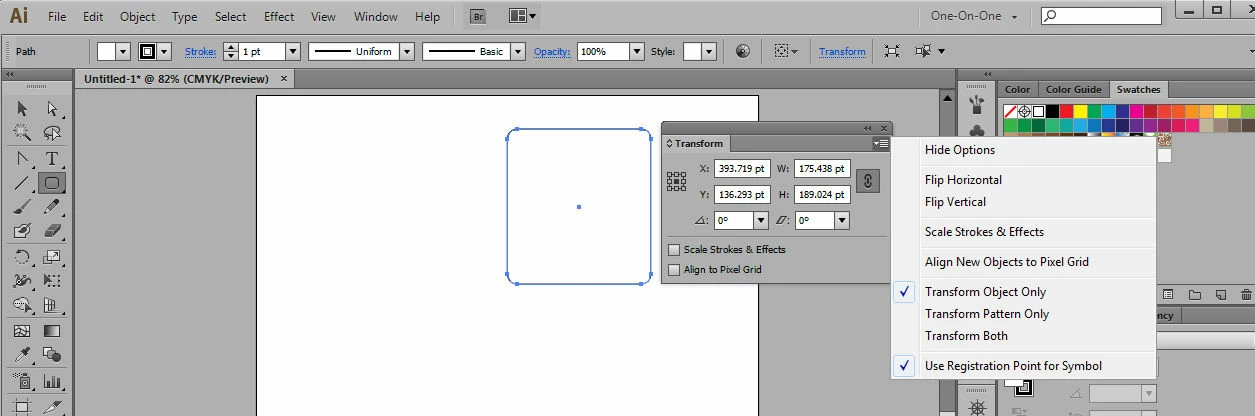
I can not find a way to display the shape properties.  There is no option on the TRANSFORM flyout.  There is no SHAPES or PROPERTIES link shown on the control panel across the top.  I've been searching for 2 days and have not been able to find an answer to this CS6 Illustrator question.  Thanks.
This topic has been closed for replies.

2 replies

Jacob Bugge
Community Expert
Community Expert
November 19, 2015

Juanita,

You seem to have a rounded rectangle with sets of double Anchor Points, as opposed to the Round Corner effect or similar. So the shape is fixed and cannot be changed by removing/reapplying the effect or similar.

You may scale proportionally if you wish the corner radius to change with the size, or you may Direct Select double sets of corners (such as (ClickDragging across) all four Anchor Points forming the rightmost two corners) and move them (horizontally) by the right amount to scale the rounded rectangle in each direction without changing the corner radius.

Or something else to obtain something else.

juanitar93547203
Participant
November 19, 2015

You both have given me much to think about and explore.  Thank you so much!

Jacob Bugge
Community Expert
Community Expert
November 19, 2015

For my part you are welcome, Juanita.

I hope you will report your findings.

Monika Gause
Community Expert
Community Expert
November 19, 2015

THis feature is not in CS6

juanitar93547203
Participant
November 19, 2015

That is discouraging. No wonder I couldn't find an answer.  Then how can I change small details to these shapes?  Thanks.

Monika Gause
Community Expert
Community Expert
November 19, 2015

What do you want to change? The corners?

Take a look at:

- the round corners effect

- the script Round Any corner

- the plugin VectorScribe