1 reply

Ton Frederiks
Community Expert
Community Expert
January 6, 2025

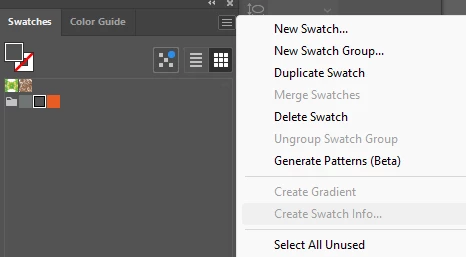
It does not appear in the panel:

Create swatch information

Create Swatch Info lets you create color specifications for multiple colors on cards to share with collaborators.

  1. Select your colors from the Swatches panel and choose Create Swatch Info from the Swatches panel menu.

  2. In the dialog box that appears, you can adjust the card’s width, height, text color, stacking order, and spacing between each card.

Participant
February 11, 2025

Create gradient info doesn't show up at all for me. I have the colors in a New Group.  I have selected all of the colors in the swatches panel, but that option does not show up under Create Gradient

Ton Frederiks
Community Expert
Community Expert
February 11, 2025

Which Illustrator version are you using?