
Participating Frequently
June 11, 2018
Answered

How do I make a 3D cube with a 10 X 10 X 10 in grid in color?

  • June 11, 2018
  • 3 replies
  • 1699 views

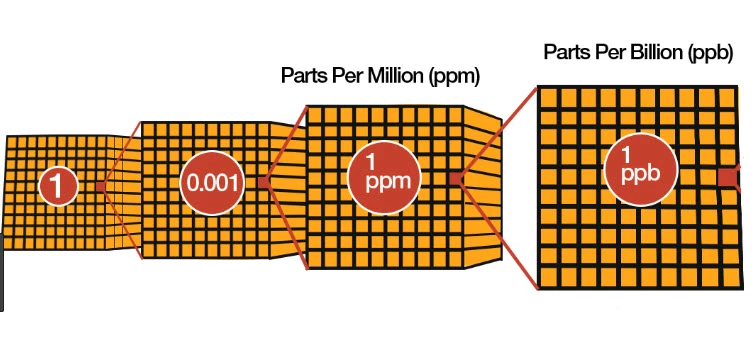
I wan to make a 10 X 10 X 10 grid in color 3D. Like the one in the picture. I have been searching and trying but nothing works. These are like I want but I want better.

Thank you.
This topic has been closed for replies.
Correct answer Srishti Bali

Hi there,

Here is a video tutorial which might be helpful for you:

Isometric Rubik’s Cube in Illustrator- Illustrator Tutorial - YouTube

Regards,

Srishti

3 replies

WaterdocAuthor
Participating Frequently
June 13, 2018

This was very helpful even though the first part was not appropriate for what I am doing. Thank you.

Ton Frederiks
Community Expert
Community Expert
June 11, 2018

You can try this:

WaterdocAuthor
Participating Frequently
June 13, 2018

This worked for me only partially and I think it is because I am not that good with using Illustrator. I could not figure out how to map the second face of the cube. I do appreciate your help and patience. Regards.

Ton Frederiks
Community Expert
Community Expert
June 13, 2018

Thank you.

You can read more here in the Help file:

https://helpx.adobe.com/illustrator/using/creating-3d-objects.html

See:

Map artwork to a 3D object

To select which object surface you want to map, click the first , previous , next , and last  surface arrow buttons, or enter a surface number in the text box.

A light gray color mark appears on the surfaces that are currently visible. A dark gray color mark appears on the surfaces that are hidden by the object’s current position. When a surface is selected in the dialog box, the selected surface is outlined in red in the document window.

Srishti Bali
Community Manager
Srishti BaliCommunity ManagerCorrect answer
Community Manager
June 11, 2018

Hi there,

Here is a video tutorial which might be helpful for you:

Isometric Rubik’s Cube in Illustrator- Illustrator Tutorial - YouTube

Regards,

Srishti

WaterdocAuthor
Participating Frequently
June 11, 2018

Thank you. I must leave the office now. I will try tomorrow.