Participant
September 6, 2023
Question

HOW DO I MAKE AN IMAGE LIKE THIS?
  • September 6, 2023
  • 3 replies
  • 259 views

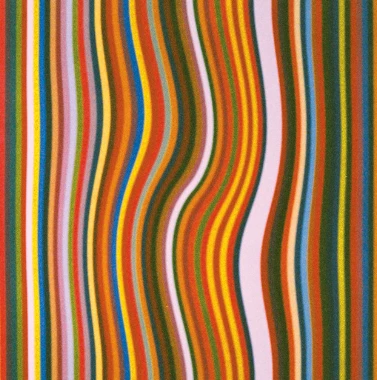
I've been infatuiated with this kind of artwork and I was wondering if anyone has any tips on making this in illustrator or photoshop? I feel like it should be simple but I can't figure it out lol. 

This topic has been closed for replies.

3 replies

Monika Gause
Community Expert
Community Expert
September 6, 2023

First applying a mesh like Bobby wrote and then using the Liquify tools on it like Ton said could be yet another option. It has the benefit that the distortion would be more soft and is reversible (because of the mesh)

Ton Frederiks
Community Expert
Community Expert
September 6, 2023

The Warp tool could be an other option: Shft R

Community Expert
September 6, 2023

In Adobe Illustrator you can try using an Envelope Mesh. Create a bunch of vertical rectangles butted up against each other and group the contents. Then go to Object>Envelope Distort>Distort With Mesh. You can pick how many rows and colums you want in the mesh. Click on the anchor points in the mesh to edit them and their direction handles to adjust how curvy the lines should be. It's a non-destructive effect that is simple to reset if things go wonky.


Another approach is using blends on some vertical open path lines. Edit the bends in the primary paths how you want them to look and then apply blends to fill the in-between steps. The paths can be stroked with different colors. Or they can be joined with other paths to form closed shapes. This is a more time consuming approach, but the end results can be more precisely controlled.