Participating Frequently
April 4, 2022
Answered

How do I make this smoother?

  • April 4, 2022
  • 4 replies
  • 919 views

Hello, 

How can I make this smoother? I want the word to look like it's growing each side from the N.

I've looked at the effects but can't find anything that gives the right result.

I hope this makes sense to someone!

This topic has been closed for replies.
Correct answer kphotopage

Becky, Hi.


To add to what has already been suggested,


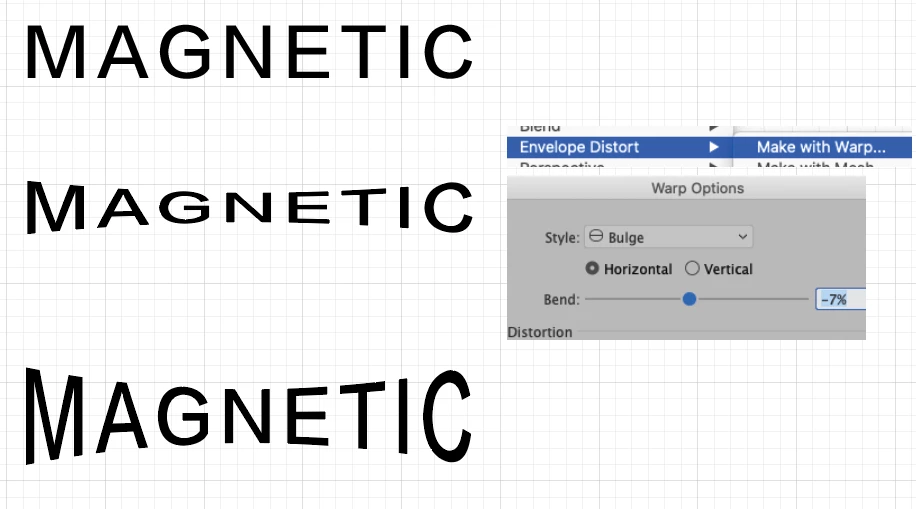
Here I set my type.


Object > Envelope Distort > Make with Warp.

Here I applied a slight Bulge,-7%


Selection Tool (black arrow), drag downward on bottom center handle


You also have Options to Expand or Edit Contents.


K
4 replies

Jacob Bugge
Community Expert
Community Expert
April 4, 2022

Ah, Becky, I saw your screenshot as showing growth along straight lines, as a bow tie shape.


kphotopage
kphotopageCorrect answer
Legend
April 4, 2022

Becky, Hi.


To add to what has already been suggested,


Here I set my type.


Object > Envelope Distort > Make with Warp.

Here I applied a slight Bulge,-7%


Selection Tool (black arrow), drag downward on bottom center handle


You also have Options to Expand or Edit Contents.


K

Participating Frequently
April 4, 2022

This is great, thank you so much!

Jacob Bugge
Community Expert
Community Expert
April 4, 2022

Becky,


If you are satisfied with this simple way, you can:


1) Write your word, you can keep it as live Type, then create a nofill/nostroke rectangle at least as large as the Bounding Box and apply Object>Path>Add Anchor Points, then centre align and Group;

2) Deselect, then Direct Select the rectangle and copy it to the front (Ctrl/Cmd+C+F+X+C), then move the middle Anchor Points at top and bottom towards each other to get the desired bow tie shape;

3) Select everything and Object>Envelope Distort>Make with Top Object.


Ctrl/Cmd+Z is your friends.


If you wish to stretch the outer letters instead, move the corner Anchor Points away from each other.


Edit: Images to show the way(s) all as live Type, the original in the middle:


Click Here to see in Chrome 

Participating Frequently
April 4, 2022

Thank you!! 

Prbolem is, when I try to envelope distort, this happens:

No matter if it's outlined or live text. So weird. The object was in front of the text too.

Jacob Bugge
Community Expert
Community Expert
April 4, 2022

Becky,


You (still) have a curved shape at top and bottom.


My suggestion was based on a top object as a bow tie shape with straight segments, made by moving centre/corner Anchor Points up/down, see the screenshot below with the objects/frames shown in red, and it is important that you have corresponding Anchor Points on the rectangle grouped with the live Type in 1) and on the rectangle turned into a bow shape in 2).


What happens if you try that?


Click Here to see in Chrome 

Eric Dumas
Community Expert
Community Expert
April 4, 2022

Hi,

I think I get it. You want to make the word look like it is bending around a curve, in your sample the letther remain straight up, so the effect does not work.

You can test a couple of techniques (in my experience, other designers will have other ideas):

  •  you can use Object >> Envelope Distort (3 choices: Warp, Mesh and Object)
    it works better with point-text, not paragraph text. So use the text tool and click on your artboard instead of drawing a text frame.
  • Warp is the easiest, Try Bulge, with Horizontal and a Blend of about -12. Test different values and you might need to scale the result in height only (vertically)
  • Mesh, will add points around your word, use the direct selection tool (white arrow - shortcaut A) to select points and move them, adjust the bends of the bezier curves. It is a bit more complex as you have a much higher level of control, select 2 points to move of the same amount on either side of the mesh. 
  • Object means you draw a closed curve with your pen tool (for example), select the object an your text with the selection tool (black arrow) and apply the Object>Envelope distort> Make with top object. The text will stretch to fit in the shape. Sometimes you will get unexpected results, works best for weird shapes. 
Participating Frequently
April 4, 2022

Thank you so much! 


When I try to envelope distort, this happens:

So it all looks like a jumbled mess - any ideas why? The object was in front of the text.
