

Chris  G
Inspiring
April 11, 2019
Answered

How do I re-number the Artboards?

  • April 11, 2019
  • 4 replies
  • 84433 views

I've just switched to Illustrator CC 2019 from CS5 on MAC and I think I've found a weird bug.

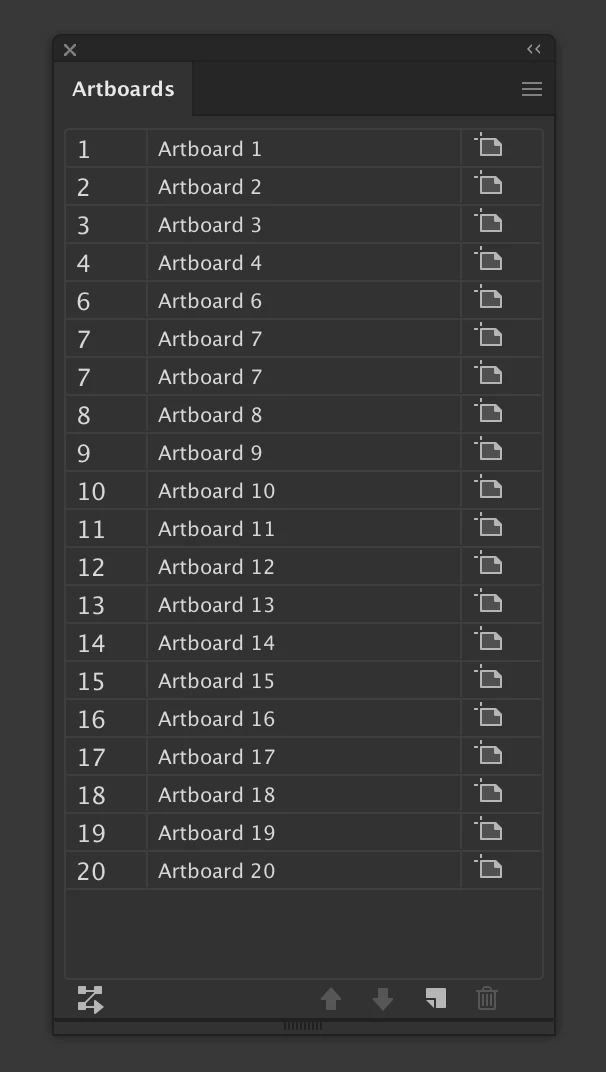
When I add or duplicate an artboard it always skips number 5, has duplicates of number 7 then continues along normally (at least up to number 20 for this experiment).  Is there a way to fix this?

The attached image is from a new document that I created and just added 20 total artboards.  I typically only work with 5 to 6 artboards, so the skipping of number 5 and duplicate of number 7 is very annoying.  I've tried quitting/restarting, rebooting the system, multiple new documents, multiple existing documents created with CS5.  All have the same result.

Any help or advice is greatly appreciated!
Correct answer Divakaran S

If you have designs on all Artboards > make sure to keep your layers unhidden & unlocked

Window > Arboards > Re-arrange the artboards manually (once done) > (Click the Burger Menu) > (Click) Rearrange all Artboards > Select the preferred pattern of your choice > (Check) Move Artwork with Artboard > Done.

4 replies

Divakaran SCorrect answer
Participant
June 21, 2024

If you have designs on all Artboards > make sure to keep your layers unhidden & unlocked

Window > Arboards > Re-arrange the artboards manually (once done) > (Click the Burger Menu) > (Click) Rearrange all Artboards > Select the preferred pattern of your choice > (Check) Move Artwork with Artboard > Done.

July 4, 2024

Thank you!

Participant
November 12, 2024

Thank you, too.

alexanderz13768765
Participant
July 30, 2019

I am having the same issue. It seems to be a bug. If I create a new document and add artboards the numbering is correct. But in one of the documents the numbering skips a value (e.g. 1,2,3,4,5,6,8), moreover if you try to export the specific artboard #8 I get an error saying that such an artboard does not exist, it is in fact #7.

Monika Gause
Community Expert
Community Expert
July 30, 2019

alexanderz13768765  schrieb

I am having the same issue. It seems to be a bug. If I create a new document and add artboards the numbering is correct. But in one of the documents the numbering skips a value (e.g. 1,2,3,4,5,6,8), moreover if you try to export the specific artboard #8 I get an error saying that such an artboard does not exist, it is in fact #7.

Which version exactly is this? Please check "About Illustrator"

If it's the latest version, please check if you rebuilt the preferences.

alexanderz13768765
Participant
July 30, 2019

Illustrator Version: 23.0.4

resetting helped, thanks!

John Mensinger
Community Expert
Community Expert
April 11, 2019

zyrobyte  wrote

I've tried quitting/restarting, rebooting the system, multiple new documents

Have you reset preferences?

Chris  G
Chris GAuthor
Inspiring
April 11, 2019

https://forums.adobe.com/people/John+Mensinger  wrote

zyrobyte   wrote

I've tried quitting/restarting, rebooting the system, multiple new documents

Have you reset preferences?

Yes, this is also a fresh install.  As I mentioned, I just switched from CS5 to CC2019.  So I'm still getting used to the slight differences.  This one was a glaring difference I noticed.

John Mensinger
Community Expert
Community Expert
April 11, 2019

zyrobyte  wrote

https://forums.adobe.com/people/John+Mensinger   wrote

zyrobyte    wrote

I've tried quitting/restarting, rebooting the system, multiple new documents

Have you reset preferences?

Yes, this is also a fresh install.

I know you said "yes" there, but the fact that you felt it necessary to mention the fresh install compels me to suggest that you reset preferences again. The "freshness" of the install doesn't guarantee clean operation. And, if when you installed the new version, if you chose to preserve your settings from the previous install (assuming you were presented with the option), that by itself could be the source of your problems.

I can't reproduce the problem here. A new document with 20 artboards numbers them correctly.

For what it's worth, and to answer the question asked in the thread title, you can rename/renumber artboards in any way you want. Just double-click on one in the Artboards panel to rename it.

barbara_a7746676
Community Expert
Community Expert
April 11, 2019

To change the number of an artboard you can drag it in the artboards panel to rearrange it. Note that this will not change the actual physical position of the artboard.

Chris  G
Chris GAuthor
Inspiring
April 11, 2019

https://forums.adobe.com/people/Barbara+Ash  wrote

To change the number of an artboard you can drag it in the artboards panel to rearrange it. Note that this will not change the actual physical position of the artboard.

I'm not sure that works.  I recorded doing what you said but all that does is change the placement of the artboards.  The numbers on the left side are what I want to change.  They remain out of order.  (Missing 5, duplicate of 7).