Participant
March 6, 2023
Answered

How do I stop my images embedding on placement or link update.

  • March 6, 2023
  • 3 replies
  • 847 views

For some reason every placed image or update to an existing link is automatically embeding. How do I stop this happening?

This topic has been closed for replies.
Correct answer Mike_Gondek10189183

You are saving to .ai format, not pdf correct? Ensure this setting is unchecked.
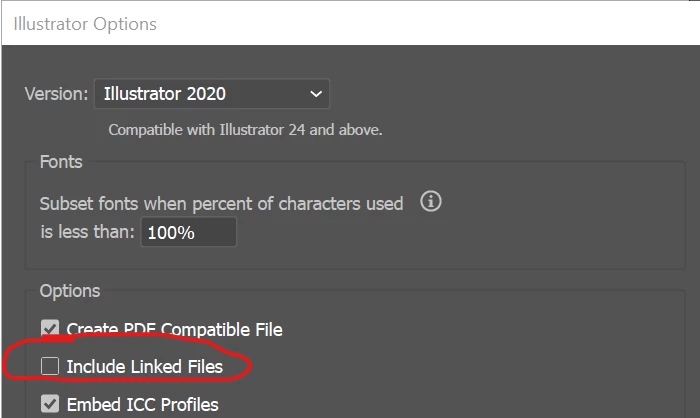


What version of .ai, I think I saw a message asking if you wish to embed on the new version which may have been accidentally been clicked.

3 replies

Mike_Gondek10189183
Community Expert
Mike_Gondek10189183Community ExpertCorrect answer
Community Expert
March 6, 2023

You are saving to .ai format, not pdf correct? Ensure this setting is unchecked.


What version of .ai, I think I saw a message asking if you wish to embed on the new version which may have been accidentally been clicked.

Ton Frederiks
Community Expert
Community Expert
March 6, 2023

When Placing use Options to show the Link checkbox and check it.

When saving do not use the "Include Linked Files" option, leave it unchecked.

Monika Gause
Community Expert
Community Expert
March 6, 2023

Which version, which system?

From where do you link the files?

Exactly how do you save the Illustrator files?

Using which options?

At exactly which point in the workflow do the imges embed?