


- Home
- Illustrator
- Discussions
- Re: If you will clear original garment pattern (pi...
- Re: If you will clear original garment pattern (pi...

Copy link to clipboard
Copied
Let's say I have this image:
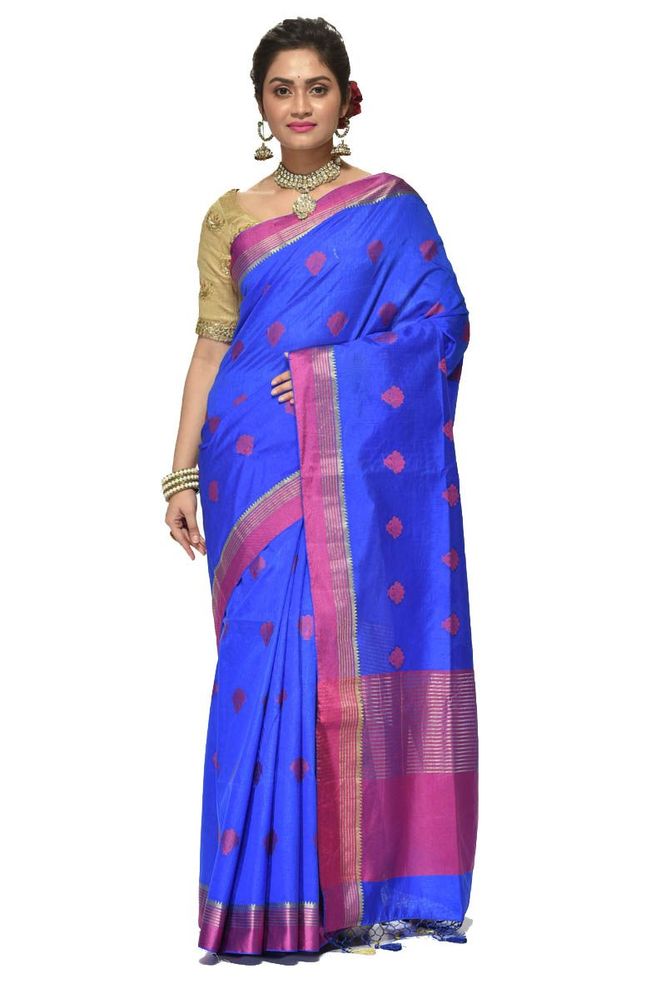
And I want to replace the fabric in the above image with this fabric:
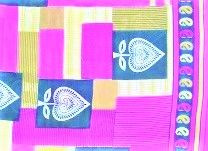
How do we achieve this using Illustrator or any other tool in CC?
Kindly let me know. I am a beginner with cc.


 2 Correct answers


You can use Adobe Photoshop as well Adobe Illustrator. The core of the thechics is to select the dress, apply mask and fill it with your pattern or you can als use your image layer and mask it.
Here is videeo tutorials for Adobe Photoshop. In Ps it easier than in Illustrator.

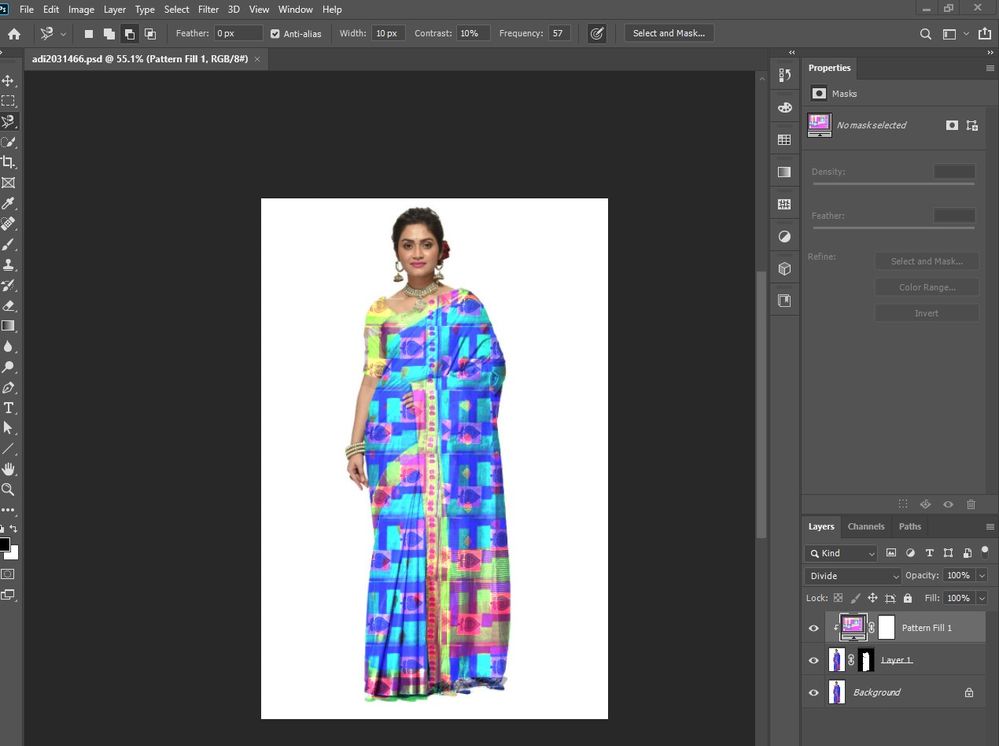
Here is image of my PS screenshot. For defining pattern you need to open your pattern image, select it and Define a pattern
- Use the Rectangle Marquee tool on any open image to select an area to use as a pattern. Feather must be set to 0 pixels. Note that large images may become unwieldy.
- Choose Edit > Define Pattern.
- Enter a name for the pattern in the Pattern Name dialog box.
Do not forget to choose blend mode for you pattern layer or make it transparent

Explore related tutorials & articles
 28
Replies
28
28
Replies
28


Copy link to clipboard
Copied
debopriyosanyal,
I am afraid there is no easy way.
It looks like a raster image, but even if it were image traced or something, with the body shape and all the folds there would be no simple transformation of one or more lengths of a (complete pattern of) fabric.
Copy link to clipboard
Copied
You can use Adobe Photoshop as well Adobe Illustrator. The core of the thechics is to select the dress, apply mask and fill it with your pattern or you can als use your image layer and mask it.
Here is videeo tutorials for Adobe Photoshop. In Ps it easier than in Illustrator.
![[ Photoshop Tutorial ] How to Add Patterns and Textures using Photoshop](https://i.ytimg.com/vi/1ZEFLSePlaA/hqdefault.jpg "[ Photoshop Tutorial ] How to Add Patterns and Textures using Photoshop")

Copy link to clipboard
Copied
Here is image of my PS screenshot. For defining pattern you need to open your pattern image, select it and Define a pattern
- Use the Rectangle Marquee tool on any open image to select an area to use as a pattern. Feather must be set to 0 pixels. Note that large images may become unwieldy.
- Choose Edit > Define Pattern.
- Enter a name for the pattern in the Pattern Name dialog box.
Do not forget to choose blend mode for you pattern layer or make it transparent
Copy link to clipboard
Copied
Thanks for replying. The color of the saree after the transformation does not match the fabric color. Is there a need for any other tool usage such that the color becomes exact to that of the fabric color?
Copy link to clipboard
Copied
What I am trying to accomplish is to replace the fabric worn by the model in picture one with the fabric in picture two. I am not trying to change the color or pattern in picture 1, it appears to me based on the youtube links that you have tried to change the color and the pattern. Kindly let me know if the fabric in picture 1 can be replaced with the fabric in picture 2.
Copy link to clipboard
Copied
If you will clear original garment pattern (pic 1, clear selection) you wlll lose depth of garmenth (gray regions) and your garment will become absolutely flat. That why you need to play with blend modes and transparensy of pattern for achiving the best result. Also try to use adjustment layers to correct colors

Copy link to clipboard
Copied
As I am new to CC I am unable to follow what you are saying in the above post. If you can be a bit more precise then I can perhaps comprehend better or for that matter, a visual representation would be even better.

Copy link to clipboard
Copied
To wholly replace one fabric with another, you need to remove the pattern in the first image. The fabric in the image has folds in it that create light and dark areas. There is no simple way to remove the pattern without also removing the light and dark areas. If you remove these, the pattern you replace it with will appear flat and not realistic.
Copy link to clipboard
Copied
So essentially what you are saying is that the current problem cannot be solved using adobe CC tools.
Copy link to clipboard
Copied
No; it could be done by a skilled professional. I am saying that there is no simple process. It requires a detailed knowledge of the CC apps.
Copy link to clipboard
Copied
Would you be so kind as to share a video tutorial on how to achieve this using existing adobe cc tools? That way it enriches the community while sharpening your skills and solving my problem in the least possible time.

Copy link to clipboard
Copied
"solving my problem in the least possible time."
To solve your problem in the least possible time you might want to search a professional and pay them to do it for you.
And then take up some classes and learn Photoshop. This is the kind of job that will need a deep understanding of image editing techniques in order to solve it.
Copy link to clipboard
Copied
Before we go as far as hiring someone for this, I would need to know for sure if cc can achieve this with its tools. I have my doubts.
Copy link to clipboard
Copied
Check out this video:https://www.youtube.com/watch?v=A-F7D1Y4K_k
![How to Add Patterns and Textures to Clothing in Photoshop [Fully Editable Technique]](https://i.ytimg.com/vi/A-F7D1Y4K_k/hqdefault.jpg "How to Add Patterns and Textures to Clothing in Photoshop [Fully Editable Technique]")

Copy link to clipboard
Copied
Good job, Monika. Looks like what they want.
Copy link to clipboard
Copied
Based on my understanding of the video link above what it does is that it changes the shirt color/texture with another pattern. In my problem statement above the goal is to change the fabric in link 1 with the fabric in link 2.I think it is a bit different than what is explained in the video.
Copy link to clipboard
Copied
"In my problem statement above the goal is to change the fabric in link 1 with the fabric in link 2"
Your image is just not suitable for "exchanging" the pattern. You need an image of a white garment (or light-medium grey). Then you can use the methods presented in the video.
You can now go on banging your fist on the table and demand that you want to do it nonetheless. And nobody can help you with that (especially since you seem to be a beginner). Or you can hand the job to a pro (who might be able to turn your base image into something you can use - which will take some time and be far from ideal) or you can just get a better suited photo.

Copy link to clipboard
Copied
We have told you it needs the work of a skilled professional. You ask for a YouTube tutorial; but that will not make you a skilled professional. Years of daily work with Adobe tools, solving many different and difficult problems, with thousands of hours of work, may make you a skilled professional. This may not be a cost effective solution. I suggest the least expensive solution is to reshoot the shot with the same, or a different model. Even for a skilled professional this is complex and time consuming work, and likely to cost more than reshooting; if it did not, models would be out of a job.
Copy link to clipboard
Copied
You need to look at the problem from a different perspective. In the end, these are two pictures that are nothing but numbers on a matrix that varies from 0 to 255 and the problem is to take a set of numbers from one and exchange with the other while taking care of the shadows. Keeping the tools of cc aside; this to me appears to be a programming problem. Broadly speaking if a tool takes too much time as you say to work with/learn perhaps it is time for the designers to relook at it and perhaps solve it programmatically.
Copy link to clipboard
Copied
"Broadly speaking if a tool takes too much time as you say to work with/learn perhaps it is time for the designers to relook at it and perhaps solve it programmatically."
A good user interface doesn't mean that any 6 year old can use it to create intricate artworks within 6 minutes of using it and without needing any sort of training. A good user interface instead means that an experienced professional has all support they need to accomplish their job in a reasonable amount of time.
Copy link to clipboard
Copied
"You need to look at the problem from a different perspective."
Who are you addressing this to? I'm sure that it might be possible to achieve this programatically under some circumstances if someone were to write software specifically for that purpose. But that's a hypothetical situation. It can be done in Photoshop by a user with a level of experience and ability. That's a real situation.
Copy link to clipboard
Copied
It's an interesting programming problem certainly. Take a bolt of cloth and fit it to a template of clothing on a model. Complex not just because of the folding etc but because different fabrics have different lighting qualities. It might already have been done, but I don't see much sign of it on clothing web sites, even to just change a plain tee shirt colour. It's probably still more cost effective to pay models - given that you have the range of clothing made (not applicable to saris and similar styles) and it probably costs the same to have the model for 1 garment or 10... Come to think of it, if this is valuable in any market, the sari market is particularly applicable, because there is no factor of tailoring. All this is, I suspect, of only theoretical benefit to the original postefr.
Copy link to clipboard
Copied
"Complex not just because of the folding etc but because different fabrics have different lighting qualities."
And in the case of saris there is also the way it is wrapped around the body. You would need to know it in order to realistically render any kind of fabric onto the photo.
But how would you conclude that from a photo?
Copy link to clipboard
Copied
Hmm, if there were thousands of saris to fit on one model, I can imagine custom software being made which first measures a reference sari. The reference sari fabric might be made with computer generated colours unique at every point, or marks, which the software would then analyse ready to replace. The sample rate would need to be high, to allow for creases, pleating etc. Shadow analysis would be another interesting area, probably not the most difficult.

-
- 1
- 2

Find more inspiration, events, and resources on the new Adobe Community
Explore Now
 AdChoices