

Swifty7777
Participant
March 30, 2022
Answered

How do you apply radius corners on chamfered corners?

  • March 30, 2022
  • 2 replies
  • 931 views

I have created a rectangle & applied 10mm live corners to each corner as "Chamfer" (straight 45° corners). Now I want to apply 2mm radius "round" corners to all eight of my chamfered corners but dont know how to do it? 
Correct answer Ton Frederiks

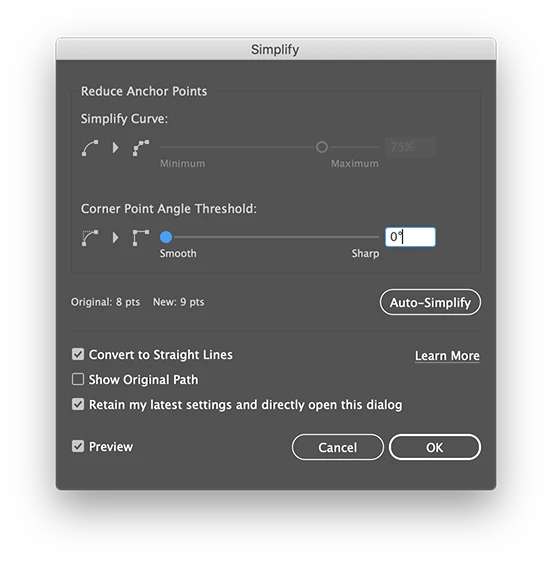
Object > Path > Simplify... with 0 degrees and straight lines should do the trick to convert the corners.

2 replies

Participant
October 24, 2025

I've just been trying to do this, not sure if you still need to know 3 years later, but what worked for me was;


select the shape, then Object>Path>Add Anchor Points.


That allowed me to add radii to my chamfered corners. Obviously after this you are not able to modify the original chamfer, but the rads are live and editable

Ton Frederiks
Community Expert
Ton FrederiksCommunity ExpertCorrect answer
Community Expert
March 30, 2022

Object > Path > Simplify... with 0 degrees and straight lines should do the trick to convert the corners.

Swifty7777
Participant
March 30, 2022

The perfect solution delivered in no time at all, BIG thanks for your help. 

Ton Frederiks
Community Expert
Community Expert
March 30, 2022

Good to hear that helped.