
gdwd
Known Participant
April 15, 2018
Answered

How do you reset a roughen effect?

  • April 15, 2018
  • 2 replies
  • 1867 views

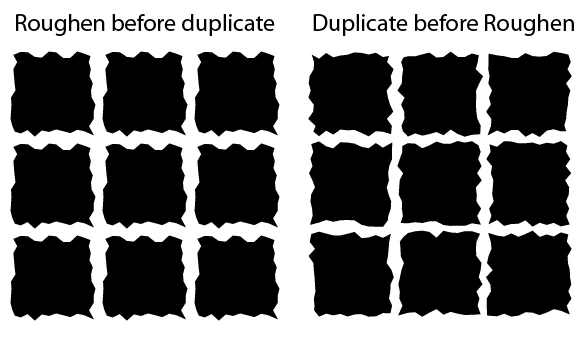
I have a lot of objects in multiple files with the identical roughen effect applied to them. And by "identical" I don't just mean the same graphic style, I mean the randomized roughens are all the same.

How can I reset/re-randomize/re-generate all of the roughens to be different, and then record it as an action or script?
This topic has been closed for replies.
Correct answer Lhemz0527

Hi @gdwd.

No scripting necessary.

Your Actions might work provided you apply Roughen  after you duplicate your objects.

Select your current objects, you can remove the roughen effect using the Appearance panel.

Then re-apply it and you will get a random effect. (I am using CC 2014/2015)

2 replies

Lhemz0527Correct answer
Participating Frequently
April 16, 2018

Hi @gdwd.

No scripting necessary.

Your Actions might work provided you apply Roughen  after you duplicate your objects.

Select your current objects, you can remove the roughen effect using the Appearance panel.

Then re-apply it and you will get a random effect. (I am using CC 2014/2015)

Michael Riordan
Inspiring
April 16, 2018

Hi gdwd

I think you're going to need some scripting for this. Clearing the squares can be assigned to an action as it is just select all, then Reduce to Basic Appearance in the Appearance panel flyout menu (assuming your art is as basic as the sample) but the action won't record the use of the effects panel unless you specifically insert a menu item (from the Actions Panel flyout menu) and even then it will need user interaction to set the roughen settings that are needed. A script should be able to bypass the limitations of the Actions Panel. If you're not a scripter you might ask for assistance in the scripting forum https://forums.adobe.com/community/illustrator/illustrator_scripting