
How to adjust paper type in Illustrator for printing?
- October 16, 2022
- 3 replies
- 4975 views
Hi,
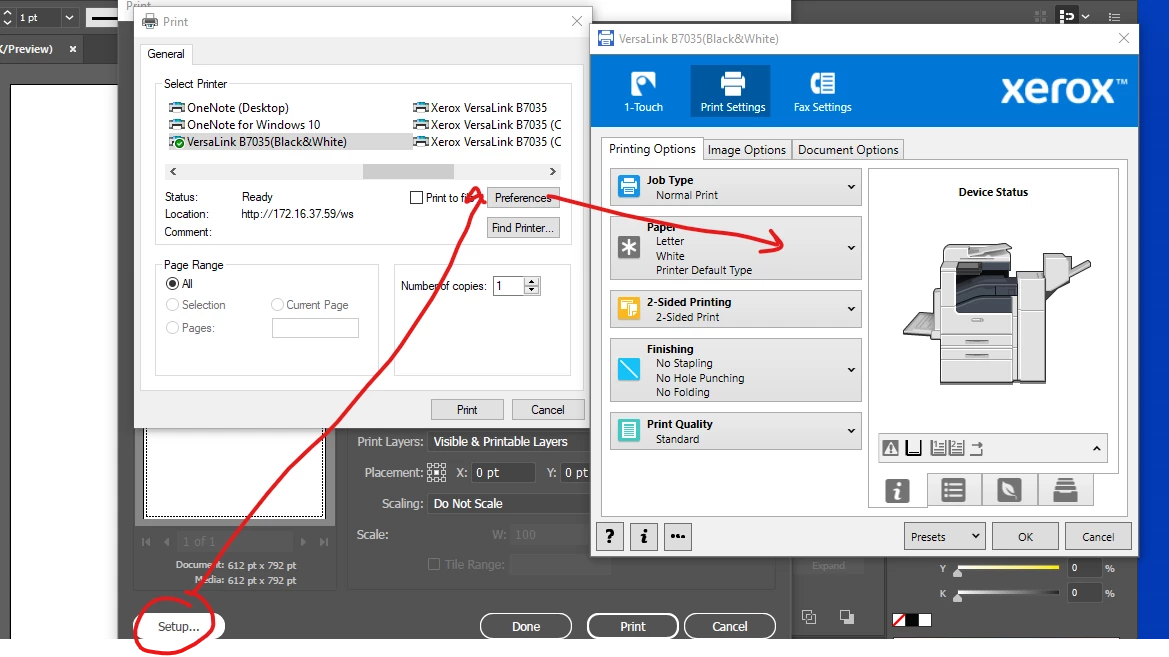
I have a pretty cheap printer, but I can adjust it's quality by changing the paper type used. When I print from any other program besides Ai, I have the option to set the paper type from plain to photopaper, which produces a much higher quality print.
However, I cannot find this option in the Ai print dialog box.
I went so far as saving my Ai file to PDF, then printed from Acrobat, which allows be to change paper type, but things would be much easier if I can just find the option in Ai.
I've been using a template in Ai for labels, and when I save the the file to PDF, then print from Acrobat, it doesn't print correctly on my labels. They are pretty off centered. When printing straight from Ai, they are perfectcly centered.
If I could just figure out how to set the paper type in Ai itself, it would solve all my problems. Thanks.
I'm attaching the Acrobat print dialog box so you ca see what I'm looking for. Appreciate your help.
 AdChoices