
Participant
November 16, 2017
Question

How to align the text at the path point?

  • November 16, 2017
  • 2 replies
  • 896 views

hey guys (:

One question:
How can I adjust the textbox exactly to the text part or what settings do I have to make to let the "Pounding Box" run exactly along the upper case height? Of course I can convert the text to paths and continue working as an object, but I don't want to do that because the text should remain editable.
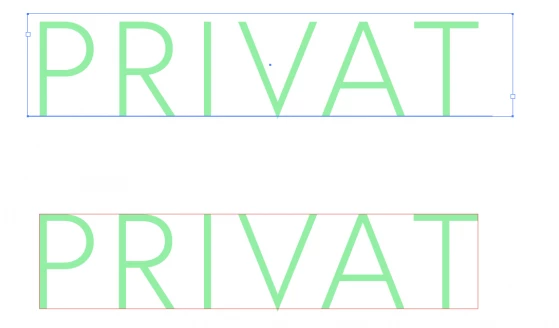
Blue Box: how it is

Red Box: how I need

I hope you understand my problem. Otherwise you are welcome to ask. (:


cheers

daniel

This topic has been closed for replies.

2 replies

Jacob Bugge
Community Expert
Community Expert
November 16, 2017

Daniel,

You may:

1) Tick Use Preview Bounds in Edit>Preferences>General;

2) Select the live Type with the (normal) Selection Tool and Effect>Path>Outline Object.

That will give you a Bounding Box that fits tightly round the live Type, and will ensure centring (both directions) and keeps doing so when you edit.

But if you need it as non outlined text in PDF you will have to remove the effect:

3) With the live Type selected, in the Appearance palette click the Reduce to Basic Appearance button.

That will bring it back to normal plain Type.

Obviously, you will need to untick Use Preview Bounds for other purposes, but you can just tick that again when you need to edit (some of) the Type if needed to keep it in place; that may not be necessary because the changes will (mostly, and only if no letters exceed the hitherto vertical bounds) be in the horizontal direction.

Doug A Roberts
Community Expert
Community Expert
November 16, 2017

i think the bounding box is probably defined by the type metrics/em square with live type, so i don't think you can just constrain it to the visible characters without outlining.

Participant
November 16, 2017

But shouldn't it be possible to work with text in a professional graphics program based on paths and vectors?

The text box is far too imprecise.

Doug A Roberts
Community Expert
Community Expert
November 16, 2017

i can't tell you what should be, just what is. if you'd like things to change, make a post on the uservoice site.

here's one with similar aims:

correction to the REAL SIZE measurements of used FONTS in the size box – Adobe Illustrator Feedback