Exit
  • Global community
    • Language:
      • Deutsch
      • English
      • Español
      • Français
      • Português
  • 日本語コミュニティ
  • 한국 커뮤니티
0

How to angle an Ellipse

New Here ,
Dec 30, 2020 Dec 30, 2020

So, I've got this ellipse below, right? Since it's like a full ellipse, it's angled at 360 degrees, how would I get 45 degrees out of it? I know I can cut it, but I don't find that so precise, and I remember doing this before another way, just don't remember what or how. If anyone could please help me with this, I've searched for about an hour, and found nothing, perhaps I didn't search right.


 

Marko5D97_0-1609379442222.png


TOPICS
Draw and design
2.8K
Translate
Report
Community guidelines
Be kind and respectful, give credit to the original source of content, and search for duplicates before posting. Learn more
community guidelines

correct answers 1 Correct answer

Community Expert , Dec 30, 2020 Dec 30, 2020

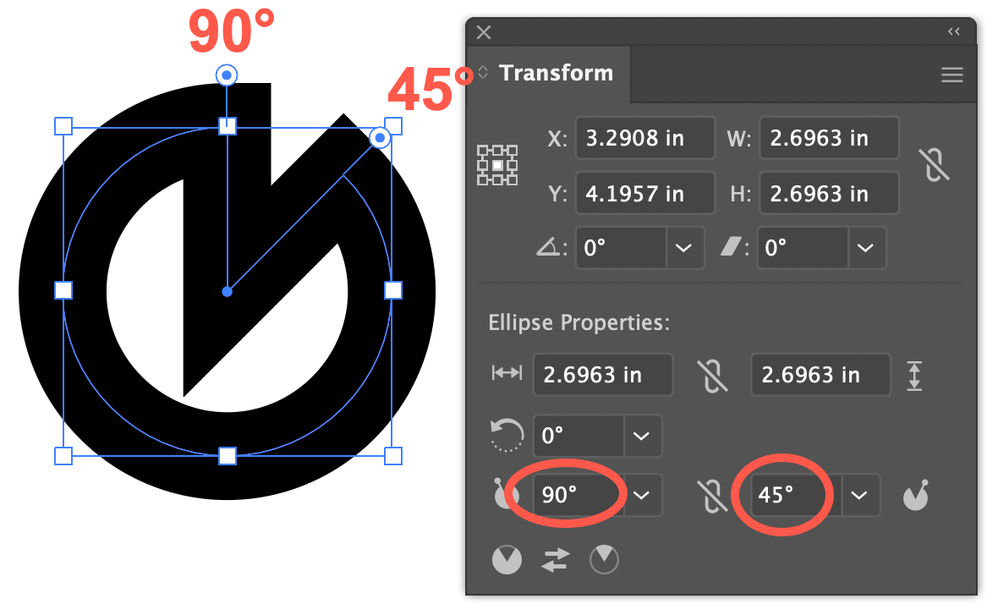
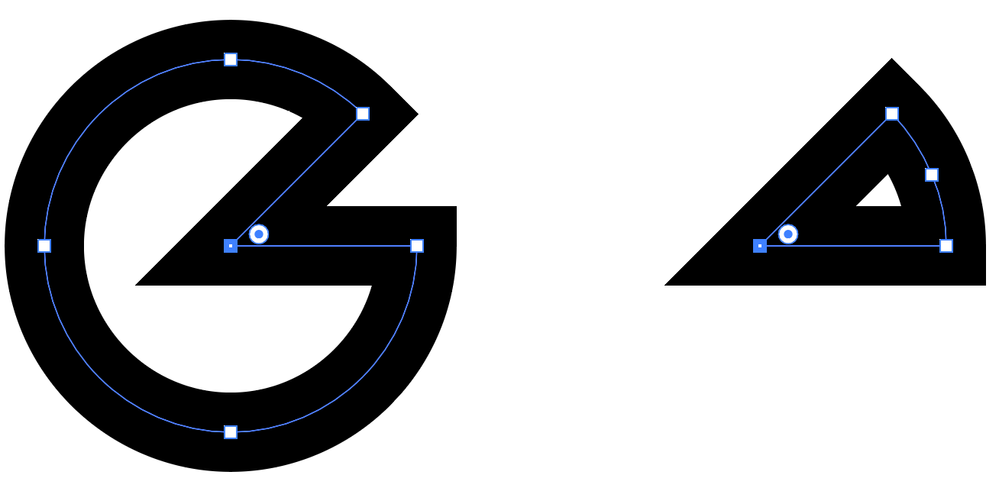
Assuming the circle/ellipse is the unmodified stroked shape generated by the ellipse tool, go to the Transform panel (Window menu > Transform) or the Transform portion of the Properties panel and enter the starting and ending angles in the appropriate fields to get the angle you want. You can also reverse the arc at the bottom of the panel. Direct-select and delete the center point to remove the radii.

tromboniator_1-1609384062631.pngtromboniator_2-1609384112730.pngtromboniator_3-1609384149612.png

Peter


Translate
Adobe
Community Expert ,
Dec 30, 2020 Dec 30, 2020

Assuming the circle/ellipse is the unmodified stroked shape generated by the ellipse tool, go to the Transform panel (Window menu > Transform) or the Transform portion of the Properties panel and enter the starting and ending angles in the appropriate fields to get the angle you want. You can also reverse the arc at the bottom of the panel. Direct-select and delete the center point to remove the radii.

tromboniator_1-1609384062631.pngtromboniator_2-1609384112730.pngtromboniator_3-1609384149612.png

Peter


Translate
Report
Community guidelines
Be kind and respectful, give credit to the original source of content, and search for duplicates before posting. Learn more
community guidelines
New Here ,
Dec 31, 2020 Dec 31, 2020

I figured it out some time after I posted, but that seems to be the solution, so thank you anyway!

Translate
Report
Community guidelines
Be kind and respectful, give credit to the original source of content, and search for duplicates before posting. Learn more
community guidelines
Community Expert ,
Dec 31, 2020 Dec 31, 2020

You're welcome. I'm glad you got there!


Peter

Translate
Report
Community guidelines
Be kind and respectful, give credit to the original source of content, and search for duplicates before posting. Learn more
community guidelines
LEGEND ,
Jan 01, 2021 Jan 01, 2021
LATEST

Hi there,


Thanks for reaching out. In addition to the correct & detailed response shared earlier, please check out this help article(https://helpx.adobe.com/in/illustrator/using/live-shapes.html) to know how you can modify shapes in Adobe Illustrator.

Hope it helps.


Regards,

Ashutosh

Translate
Report
Community guidelines
Be kind and respectful, give credit to the original source of content, and search for duplicates before posting. Learn more
community guidelines