
Sven Stone
Participating Frequently
February 19, 2020
Question

How to apply masks within appearances?

  • February 19, 2020
  • 4 replies
  • 1365 views

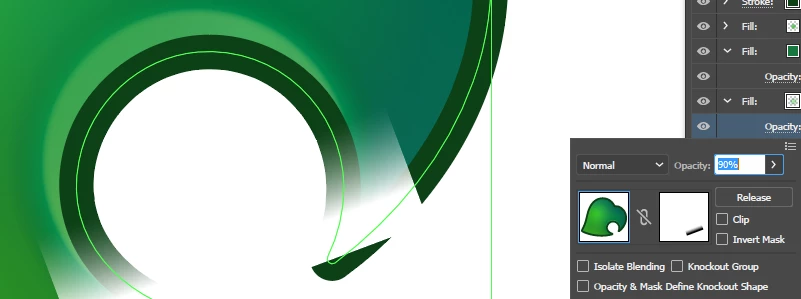
I'm trying to create a simple mask to hide parts of a fill gradient within the appearances panel, but I can't figure out how to actually apply it without it effecting the entire object. Am I missing something painfully obvious here?


This topic has been closed for replies.

4 replies

Legend
February 19, 2020

I found another, easier way that does not require a duplicate object. 

After applying transparency to the object, select the object and Group it. It won't be actually grouped with anything, but that is OK. You can then use the Appearance panel to add a new stroke to the group that contains your one object.

Much cleaner than having to add a duplicate object.


Sven Stone
Participating Frequently
February 19, 2020

Sorry, but I don't fully understand what this is meant to achieve or how it helps here. I followed your instructions and it's still excluding the rest of the object rather than just masking the gradient itself. 


Monika Gause
Community Expert
Community Expert
February 19, 2020

Can you perhaps show what this looks like now and what exactly you want to achieve?

Legend
February 19, 2020

I can see a couple of ways to do with - one would be the quick-and-easy way of duplicating your object (unmasked) above with just the stroke, not the fill. 

Another would be to duplicate your shape and use it as a clipping mask on your gradient - then add a white stroke equal to the size of the dark stroke on your object. Line the clipped gradient up with your shape, and then make your transparency mask.

Sven Stone
Participating Frequently
February 19, 2020

I ended up duplicating the object, removing the mask from the original and just hiding everything other than the fill in the duplicate. It's a bit more of a hassle than I'd like but at least it works.

meganchi
Legend
February 19, 2020

What happens if you select "clip" beneath the "Release" button on your transparency panel?

Sven Stone
Participating Frequently
February 19, 2020


Monika Gause
Community Expert
Community Expert
February 19, 2020

You want to mask just one of the fills?

Can you post the complete object and the complete appearance stack and then tell us what this is supposed to look like?

Or better: upload the file somewhere.