Nolwenn_S
Participant
January 4, 2018
Answered

How to arch a shape, illustrator CC

  • January 4, 2018
  • 3 replies
  • 19197 views

Hi everyone !

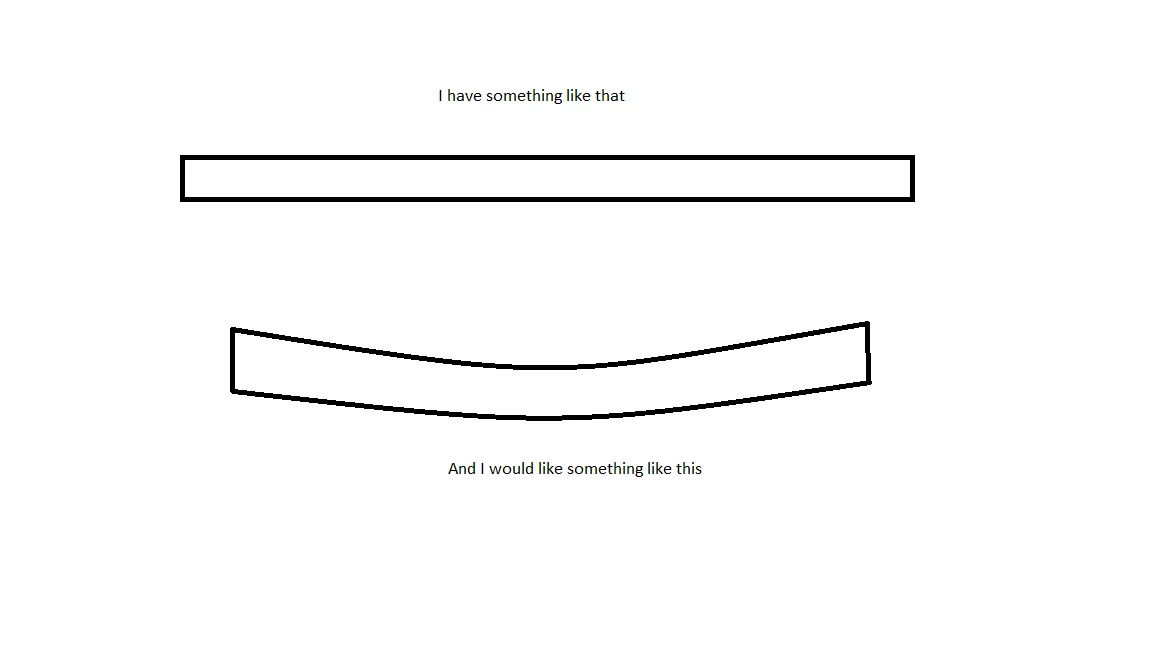
I drew a complex shape with multiple rectangle and line in Illustrator CC and I would like to arch it. Is it possible ?

Please find below a drawing of what I want-ish.

Thank you !

Nolwenn
Correct answer Monika Gause

If there is no gradient in it, try and create an art brush out of your shape, then apply the brush to a curves path.

You could also try envelopes

3 replies

Jacob Bugge
Community Expert
Community Expert
January 5, 2018

Nolwenn,

As implied by post #5 by James, Effect>Warp>Arc will probably serve you just as well as an Artbrush, and simpler to make (just the bend instead of creating an Art Brush and applying it to a customixed path).

After creating that, you can Object>Expand Appearance and cut the vertical ends (you may use (apparent) vertical cutoffs, either with a Clipping Mask (or Opacity Mask) or with actual (vertical) paths after expanding the brush (Object>Path>Divide Objects Below or Pathfinder>Minus front or something)) as already mentioned in post #4.

Nolwenn_S
Nolwenn_SAuthor
Participant
January 6, 2018

I tried artbrush, arc and arch and it worked pretty well ! Depends on what I want to the edge but I'm happy with the artbrush tool and arc (my drawing was not completely accurate).

Expand Appearance is handy too, but I didn't get the Opacity Mask part. I watched some tutorial about it but I don't get the point with what I'm looking for here. I tried Pathfinder as well and didn't get any good results. I need to watch more tutorials about it.

I think I can manage to get vertical end but using the Cutter tool (after Expand Appearance), deleting my ends and drawing new verticals ends and joint it to my shape. What do you think about this way ?

Thank you

Monika Gause
Community Expert
Community Expert
January 6, 2018

Nolwenn_S  schrieb

I think I can manage to get vertical end but using the Cutter tool (after Expand Appearance), deleting my ends and drawing new verticals ends and joint it to my shape. What do you think about this way ?

Please show an example of the actual artwork you're working on.

Jacob Bugge
Community Expert
Community Expert
January 5, 2018

Nolwenn,

The Effect>Warp>Arch will give you (fundamentally) vertical ends as in your image but give an appearance of thinning/lower height) at the ends owing to the bend.

The Art Brush suggested by Monika will give you a much better general appearance but with slanting ends (perpendicular to the direction at the ends), and a (hidden) general warping of shapes (only noticable/significant in connexion with more complicated shapes).

To get vertical ends, you may use (apparent) vertical cutoffs, either with a Clipping Mask (or Opacity Mask) or with actual (vertical) paths after expanding the brush (Object>Path>Divide Objects Below or Pathfinder>Minus front or something).

JETalmage
Inspiring
January 5, 2018
The Effect>Warp>Arch will give you (fundamentally) vertical ends as in your image but give an appearance of thinning/lower height) at the ends owing to the bend.

But Warp>Arch is different from Warp>Arc, which will act more similarly to an ArtBrush.

JET

Nolwenn_S
Nolwenn_SAuthor
Participant
January 6, 2018

I tried artbrush, arc and arch and it worked pretty well ! Depends on what I want to the edge but I'm happy with the artbrush tool and arc (my drawing was not completely accurate).

Thank you

Monika Gause
Community Expert
Monika GauseCommunity ExpertCorrect answer
Community Expert
January 4, 2018

If there is no gradient in it, try and create an art brush out of your shape, then apply the brush to a curves path.

You could also try envelopes

Nolwenn_S
Nolwenn_SAuthor
Participant
January 4, 2018

Thank you very much Monika ! It worked well with an art brush out of my shape.

Monika Gause
Community Expert
Community Expert
January 4, 2018

You're welcome and thank you for the feedback.
