
Participant
February 8, 2022
Answered

How to auto-size WIDTH of text box?

  • February 8, 2022
  • 1 reply
  • 894 views

Hello all. I am familiar with the auto-size feature for textboxes, but that doesn't help me with my issue as it only auto-sizes height (unless I'm doing something wrong). I need the textbox to autosize to width ONLY. I do not want my text to wrap to the next line. Right now, I am manually selecting the two right anchors of the text box and adjusting them pixel by pixel to get it at the perfect size. There has to be a better way! For example, in Excel, when you double click a column divider it will autosize the column to the largest line of text in that column. I'm looking for a similar function in Illustrator for textboxes. Hope this makes sense!
This topic has been closed for replies.
Correct answer Mike_Gondek10189183

Hi BreanneFM,


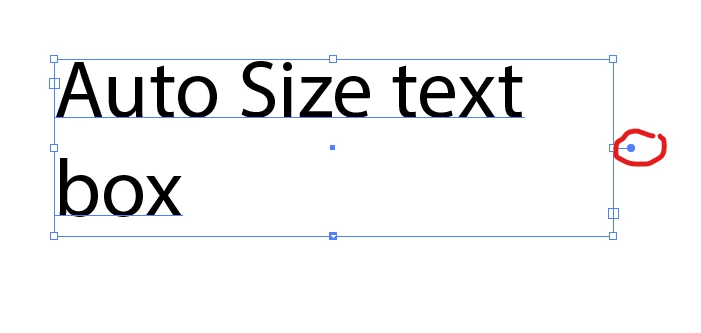
Best you can do is selct with solid arrow tool, then click where I circled in red to force the width to auto size.

Otherwise the option only works on the height.


Read this


1 reply

Mike_Gondek10189183
Community Expert
Mike_Gondek10189183Community ExpertCorrect answer
Community Expert
February 8, 2022

Hi BreanneFM,


Best you can do is selct with solid arrow tool, then click where I circled in red to force the width to auto size.

Otherwise the option only works on the height.


Read this


BreannePAuthor
Participant
February 8, 2022

Thank you! This will work perfectly for what I need it to do.