
Judico
Participant
April 14, 2018
Answered

How to bend complex paths into a spiral?

  • April 14, 2018
  • 3 replies
  • 1321 views

I'm trying to create paths for spiral piano keys similar to this:

stock-photo-piano-keyboard-printed-music-abstract-fractal-spiral-pattern-background-black-and-white-piano-keys-639844480.jpg
However, I need the final result to be paths outlining the keys rather than a brush applied to a path. Specifically I have two paths that thread back and forth through each other forming the keys, which, after warping, I am planning to export to use as motion paths in after effects.

For clarity, here's a breakdown of what my paths look like before any warping:
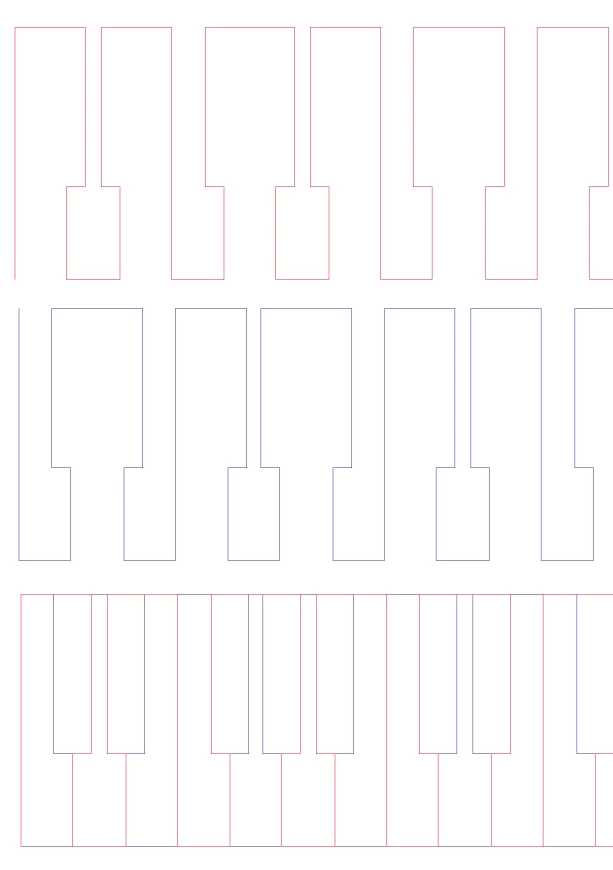
    This topic has been closed for replies.
    Correct answer Anna Lander

    what about creating the brush, adjusting the spiral and then expending appearance?

    3 replies

    Anna Lander
    Inspiring
    April 15, 2018

    use Stroke Profile for your brushed line

    Anna Lander
    Anna LanderCorrect answer
    Inspiring
    April 15, 2018

    what about creating the brush, adjusting the spiral and then expending appearance?

    Judico
    JudicoAuthor
    Participant
    April 15, 2018

    Hi Anna, Expand Appearance looks like it will do what I need.

    EDIT: Had an additional question but I figured it out; I used the width tool on the spiral's path to adjust the size of the keys as they approached the center.

    Anna Lander
    Inspiring
    April 15, 2018

    yes, this is a way. Or you can use Profile if you want to smooth width decreasing to zero.

    Mylenium
    Legend
    April 15, 2018

    It would probably be simpler to draw it directly - create a spiral, daraw a simple line, create a blend along the spiral, cleanup and connect the lines as needed/ convert them to guides for producing teh actual artwork. Anything else will likely be even more laborious, since e.g. using an envelope warp will inevitably create overlaps and wonky distortions that you still need to fix...

    Mylenium