
Answered
How to bring a 3D bevel to a point (like a pyramid)?
Hi, relative AI newbie, using AI 28.0 on Win 11 (fully updated).
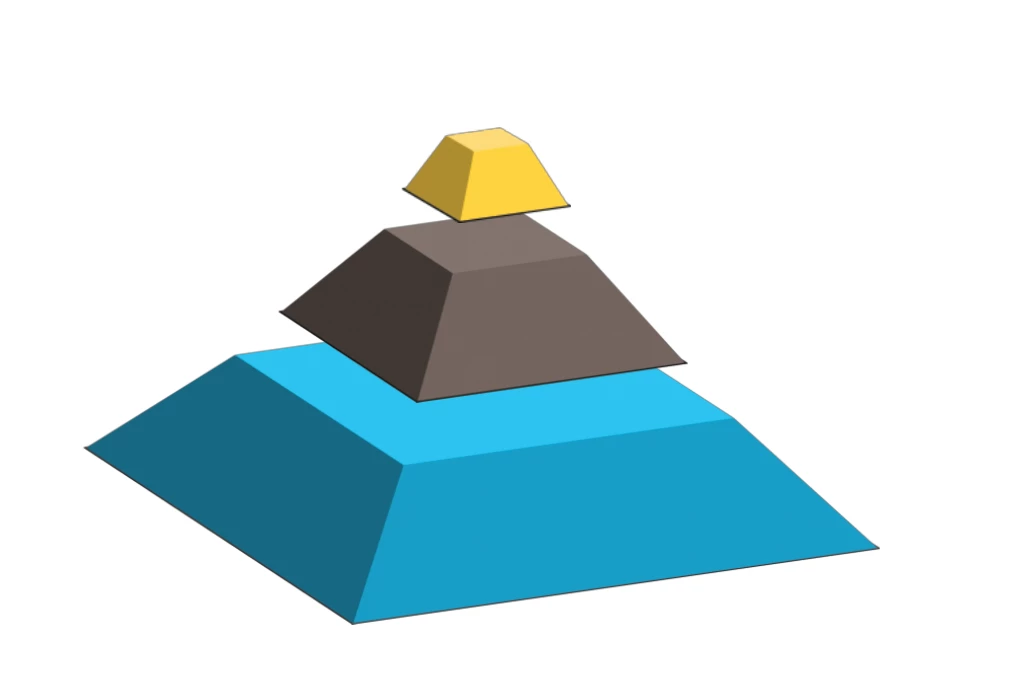
I'm trying to create a segmented pyramid. I have gotten this far just with squares. (Still need to play with sizing and lighting and shadows.)
I rotated the square in the X axis to lay it "flat." Then I beveled "up."
Here is the problem: at the top of the pyramid, I can only bevel so far. I want to bring the pyramid to a point. Perhaps I am using the wrong tool, or there is a different method I should be using instead of 3D. I imagined that the bevel would eventually reach a point... but alas, no.
Advice, please, on how to bring the top segment to a point.
Thanks as always to the community.
-j
 AdChoices