
Participant
February 21, 2017
Answered

How to change outline color on vector image

  • February 21, 2017
  • 1 reply
  • 7534 views

Hey all. Complete Illustrator newb here and sorry if this is an easy question. I have watched videos regarding it, and still cannot figure it out.

Im looking to remove the outer box of the image here:
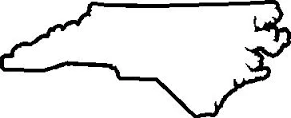
However I want to keep the white within the state and the black outline of course.

Or is there a way to achieve something like this:

However** make the outline white with black background??

Thank you all

    This topic has been closed for replies.
    Correct answer SJRiegel

    I think the easiest way would be to turn it into a Live Paint Object, then use the Live Paint Bucket to fill the center with white.

    1 reply

    Doug A Roberts
    Community Expert
    Community Expert
    February 21, 2017

    1. what do you mean by 'outer box'?

    2. what is it you have here? a vector path, or something else?

    jbrisindiAuthor
    Participant
    February 21, 2017

    Its a vector. When I got the image online it was outlined in black with white background both inside the outline and around the image.

    After watching a video I got this:

    I positioned it like that myself. But you see, all of the white is removed. I want to remove the white around the state, all while keeping the white in the state

    SJRiegelCorrect answer
    Legend
    February 21, 2017

    I think the easiest way would be to turn it into a Live Paint Object, then use the Live Paint Bucket to fill the center with white.