
Participating Frequently
June 7, 2016
Answered

How to connect anchor points from different shapes

  • June 7, 2016
  • 2 replies
  • 15403 views

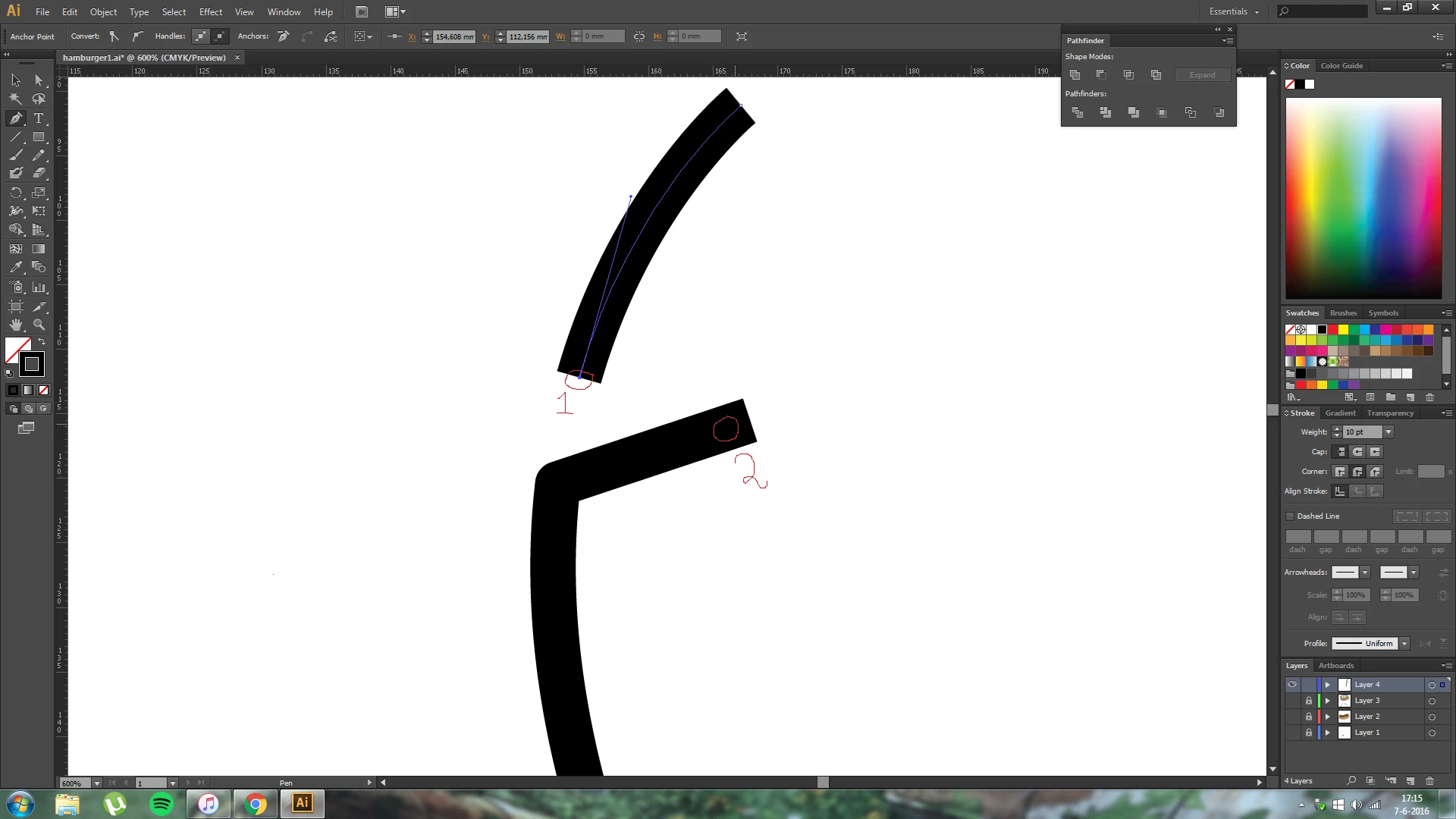
I want to connect an existing anchor point (1) from shape A to an existing anchor point (2) from shape B.

However, whenever I select anchor point 1 with the pen tool only that anchor point is visible, how can I make the other anchor points visible so that I can connect them?

See the screenshot I added.


Kind regards,


This topic has been closed for replies.
Correct answer Monika Gause

Select both anchors by circling them with the lasso tool (only those points) then Ctrl + J

You can also try and just select the two objects, usually works as well.

For better htiing a point, turn on Smart Guides in the View menu.

2 replies

Kris Hunt
Legend
June 7, 2016

You can also use the Pen tool to click on each point in succession.

Monika Gause
Community Expert
Monika GauseCommunity ExpertCorrect answer
Community Expert
June 7, 2016

Select both anchors by circling them with the lasso tool (only those points) then Ctrl + J

You can also try and just select the two objects, usually works as well.

For better htiing a point, turn on Smart Guides in the View menu.

jsh62Author
Participating Frequently
June 7, 2016

Thanks!