
Participating Frequently
September 15, 2020
Question

How to Copy/paste a transparent image from Photoshop to Illustrator

  • September 15, 2020
  • 7 replies
  • 12668 views

Hi everyone,

I work with Photoshop and Illustrator simultaneously because I paint watercolor textures on Photoshop and I change colors and make patterns on Illustrator. 

With older adobe versions I was used to paint with brush on photoshop, copy and paste on illustrator respecting all transparency of a watercolor stain for example. 

But I updated the versions and now when I paste it, there's this white ground behind the whole area.
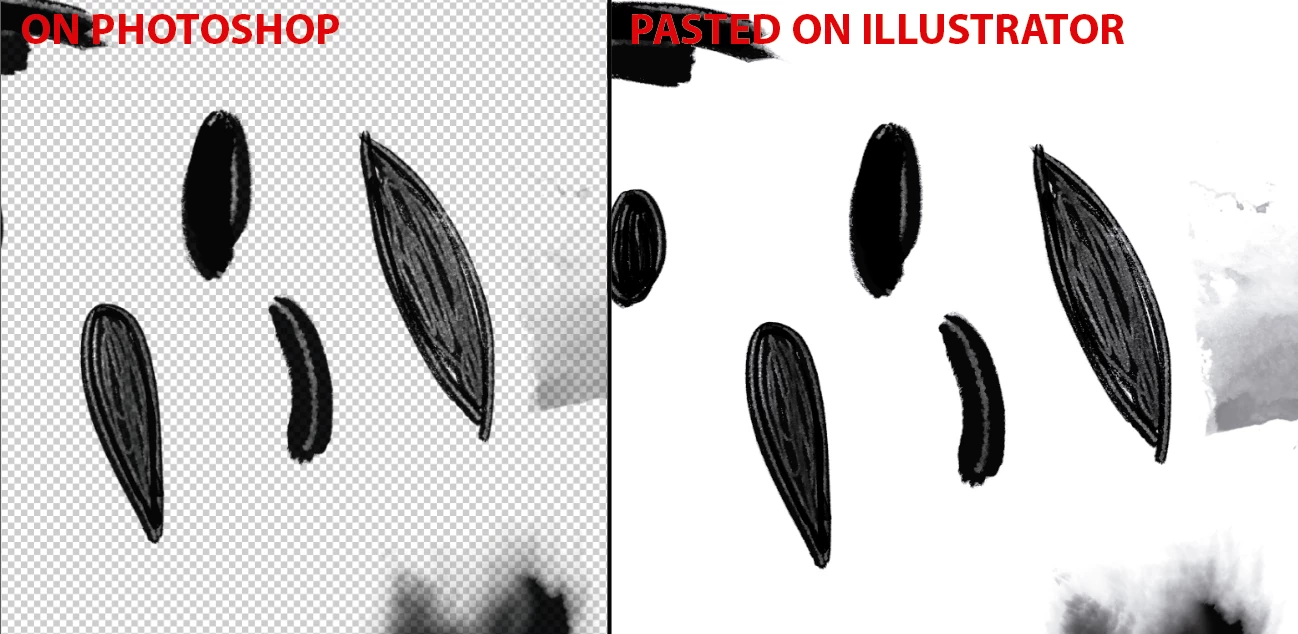
I already know that if you save that file on Photoshop as .psd .TIFF or .png and place it on Illustrator it respects the transparencies. But what I'm trying is to avoid that and save time with a shortcut I've been doing already. It should have a setting solution...

Thanks a lot!


Elena

7 replies

Snootz
Participant
July 18, 2025

A bit more cumbersome but you can select your asset, head up to Layer > Copy SVG. 


Background transparency will be preserved.

Participant
September 26, 2022

With Windows, in Photoshop, open your libraries panel, create a new library and drag and drop your item/art/asset with transparent background into there. When you open your AI file, the same library should be available. You can drag and drop from there. The background should be transparent still. Not as quick as on Mac, but much quicker than saving as png then and opening in ai. And all of your assets will be available in all Adobe products that support Libraries. 

Participant
September 26, 2022

Also, after dragging and dropping from the library, don't for get to EMBED the image into the file.

(and an image to show the library)

Participant
January 27, 2022

Hello everyone,


I'm having the same issue when trying to paste from Photoshop to Illustrator, but I've noticed that this only happens on Windows. I work on Mac and paste images with a transparent background on a daily basis, which is not a problem, but when I try to do the same on my Windows, the image flattens and it's given a white background. I came here thinking it could be a quick fix by enabling something on the settings, but now I know that isn't the case.


Being able to paste transparent background images straight from Photoshop to Illustartor is a time saver, so I hope this is something that can be addressed and fixed, either by Adobe or Microsoft, so we can finally paste this kind of material as opposed to having to save a file first in order to place it or link it in Illustrator.


BTW, I'm running the lastest version of Illustrator (26.0.2) and Photoshop (23.1.1) on both machines as of 01-27-22.

Monika Gause
Community Expert
Community Expert
January 27, 2022

Are you sure there is nothing installed in your Windows system that "enhances" the clipboard?

Jonathan R. W.
Participant
February 19, 2021

I'm having this same issue. I used to simply 'Copy SVG' from Photoshop and paste into Illustrator with no issue, but recently, I lose the transparency from Photoshop and it's replaced with a white background. 


I now have to export as PNG or SVG and then bring them over to Illustrator through file folder. It works just as well, just with 10x as much time.


Thank you for any help here! (Windows 10)

Kurt Gold
Community Expert
Community Expert
September 15, 2020

On a Macintosh machine it works fine for me, but at first glance I can see the issue on a Windows machine (Windows 10, latest version of Illustrator).


Some more investigation is required to find out if there is a specific setting that may cure it or if it is a misbehaviour/bug.

Elena5E57Author
Participating Frequently
September 16, 2020

I'll keep looking for an answer! 

Monika Gause
Community Expert
Community Expert
September 16, 2020

If you search several forums for the Windows clipboard, there seem to be some general issues with it happening in several applications. So you might head over to Windows forums to ask this and maybe people have a solution.

Kurt Gold
Community Expert
Community Expert
September 15, 2020

Are you using a Macintosh machine or a Windows machine?

Elena5E57Author
Participating Frequently
September 15, 2020

a Windows pc.

Monika Gause
Community Expert
Community Expert
September 15, 2020

I can't see any issues with that in Illustrator and Photoshop 2020.

Elena5E57Author
Participating Frequently
September 15, 2020

Hi Monika,

What do you mean? 

You don't have that issue in your versions 2020 or you don't see any issue with that?

It's just a shortcut to save time when I draw multiples things in Photoshop to import them to Illustrator, so I don't have to draw each item on one layer and save it to place that file in Illustrator. 

Thanks anyway.


Monika Gause
Community Expert
Community Expert
September 15, 2020

This works without a problem for me. Copy and paste from Photoshop into Illustrator works with transparent images.