
pernillegraphic
Participant
September 28, 2017
Resuelto

How to create a pattern with watercolor/paint splash effect in Illustrator?

  • September 28, 2017
  • 3 respuestas
  • 2102 visualizaciones

I have fallen in love with the pattern on the orange bowl, and is in doubt on how to create it. And it is primarily  the round shapes with paint/watercolor textures that I have a little difficulties on getting started on. The pattern has to be scalable, so it will fit both big and small posters. Hope anyone has some suggestions or maybe know some guides that will get me started. Unfortunately I haven't gotten any luck searching myself.
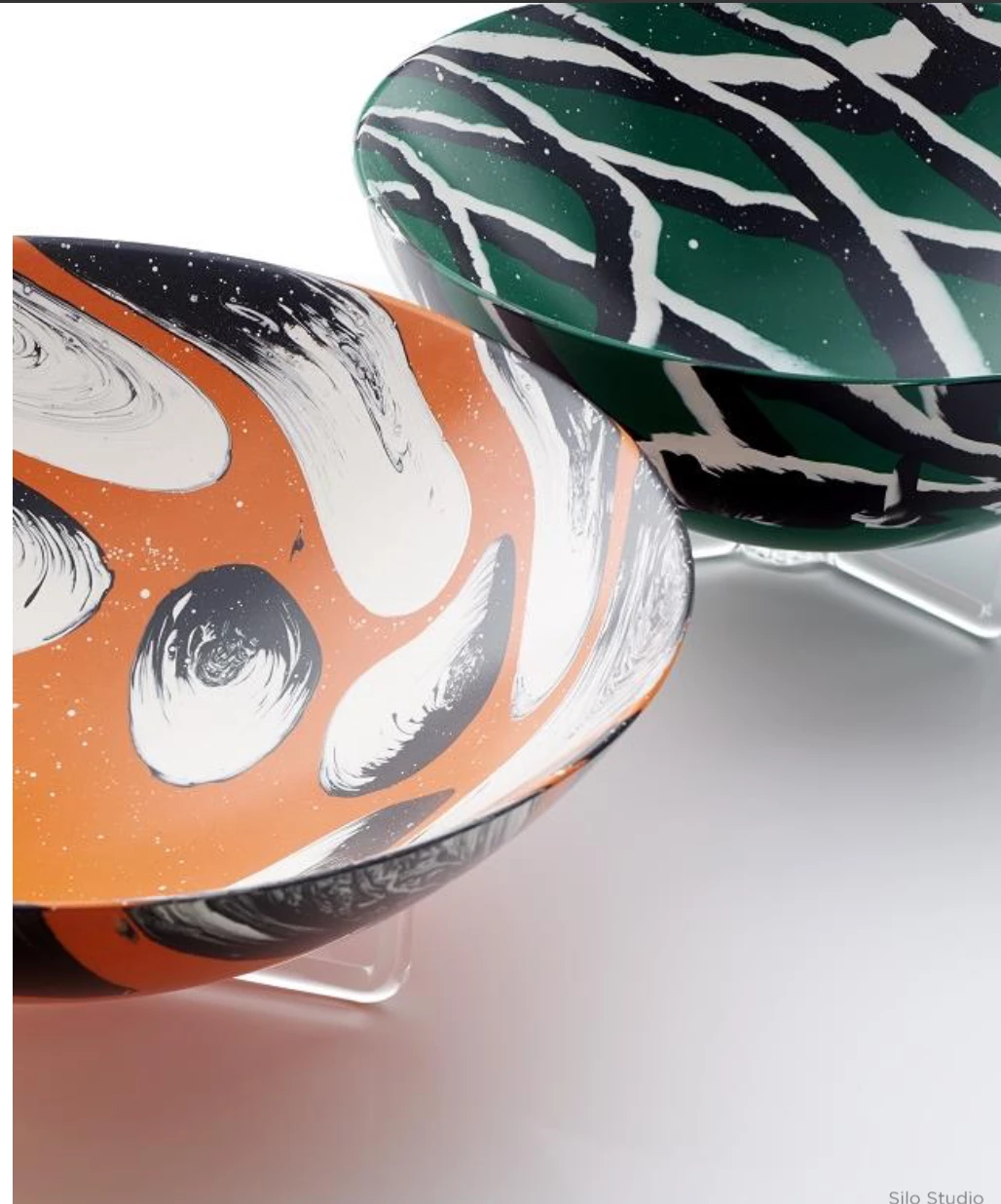
[Moved from the non-technical Lounge Forum to the specific Program forum... Mod]

[Here is the list of all Adobe forums... https://forums.adobe.com/welcome]

Este tema ha sido cerrado para respuestas.
Mejor respuesta de Myra Ferguson

There are some sites like freepik.com where you can get vectors of paint. Download the file, extract it, and open it. Then you can drag one (if there are multiple selections) to the Brushes and make an art brush out of it.

You make a similar effect with preset vector art brushes in Adobe Animate.

Another option is to make your own brush with the mobile app Capture CC Adobe Capture CC | Edit photos, shapes to vectors and graphics

3 respuestas

Myra Ferguson
Community Expert
Myra FergusonCommunity ExpertRespuesta
Community Expert
September 28, 2017

There are some sites like freepik.com where you can get vectors of paint. Download the file, extract it, and open it. Then you can drag one (if there are multiple selections) to the Brushes and make an art brush out of it.

You make a similar effect with preset vector art brushes in Adobe Animate.

Another option is to make your own brush with the mobile app Capture CC Adobe Capture CC | Edit photos, shapes to vectors and graphics

Monika Gause
Community Expert
Community Expert
September 28, 2017

Paint these in analog, scan the artwork and then trace it in black and white? Then add some color to it in Illustrator?

Or work with high quality brushes, such as: https://www.retrosupply.co/collections/von-glitschka/products/dragstrip-2-vector-brush-pack

JonathanArias
Legend
September 28, 2017

i begun my pattern making work after watching Von Glitschka. After watching his course i understood how to make them and apply them on to my work. I would recommend you watch it so you can know how they are made, tips and issues/how to solve them

Here is his course on it:

Drawing Vector Graphics: Patterns

Nigel French also has a course on it, i have not watched that one

Creating the pattern in Illustrator