
Known Participant
February 8, 2025
Answered

How to create something like this - inverted colour on top of another?

  • February 8, 2025
  • 3 replies
  • 436 views

Hi there,


I am wondering if it is possible to create something like this in which shapes are inverted to the opposite colour when placed on top of another?
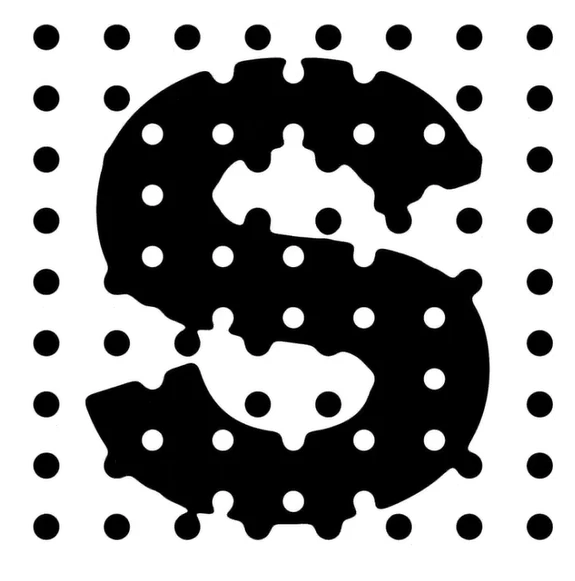


Is there a setting in which this acn be done or would it be a matter of colouring each shape manually?


Thanks!

Correct answer bluebrad

Here is another option for you to create. this pattern so that you can alley one pattern to the text and one pattern to a background layer.

https://youtu.be/leD3a71YrwY


3 replies

bluebradCommunity ExpertCorrect answer
Community Expert
February 9, 2025

Here is another option for you to create. this pattern so that you can alley one pattern to the text and one pattern to a background layer.

https://youtu.be/leD3a71YrwY


Illustrator is open almost 24/7 and just about the same for Bridge and Photoshop
Community Expert
February 9, 2025

In the specific example of that "S" graphic Pathfinder effects could be used to make the dots cut through the "S". Different methods can be used to round the corners where the circles cut through the "S" afterward.


It also looks like that graphic could have been auto-traced from a pixel-based image (which might also explain the rounded corners where the circles knock thru the "S" shape). Either way, it's going to need to be a compound path (like Monika mentioned) to be joined as a single object with the white "holes" cutting through the "S".

Monika Gause
Community Expert
Community Expert
February 8, 2025

With a compound shape his is possible: https://youtu.be/th_o1pW6GjM