May 8, 2022
Answered

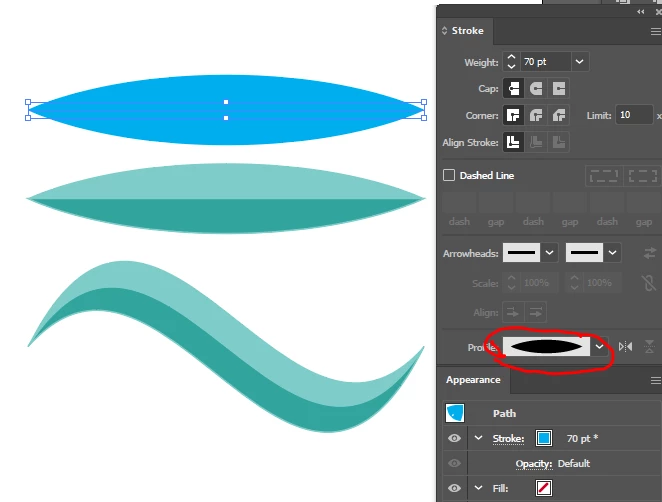
How to create this logo?

  • May 8, 2022
  • 2 replies
  • 1376 views

Was studying logos of companies and came across one by lenskart. Want to know how to create this in illustrator (not to copy but know how its done)

This topic has been closed for replies.
Correct answer Mike_Gondek10189183


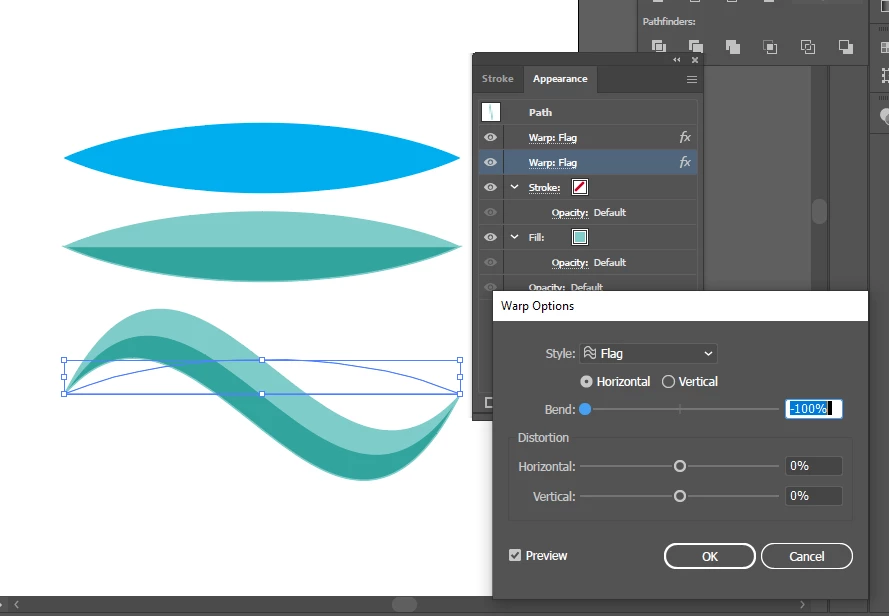
I applied effect > warp > flag twice as once was nto enought
 

2 replies

michelew83603738
Community Expert
Community Expert
May 8, 2022

I would draw the shapes with the pen tool. Then they are using gradient fills to create the depth of the shape.

May 9, 2022

Tried to buy got real messy 😭

Mike_Gondek10189183
Community Expert
Mike_Gondek10189183Community ExpertCorrect answer
Community Expert
May 9, 2022


I applied effect > warp > flag twice as once was nto enought


Monika Gause
Community Expert
Community Expert
May 8, 2022

You would draw all those paths and then use the Live Paint tool to fill in the shapes.


May 9, 2022

But how do I get it so smooth and symmetrical? 

Jacob Bugge
Community Expert
Community Expert
May 9, 2022

vl,


"But how do I get it so smooth and symmetrical?"


You are seeing asymmetries that give the impression of an underlying symmetry, with some symmetrical key parts.


To create something equivalent, you can start out with the (simple) underlying symmetrical artwork, then change and elaborate.