
Known Participant
September 5, 2022
Answered

How to cut off dropped shadow

  • September 5, 2022
  • 3 replies
  • 1117 views

Dear Community,

I would appreciate help on the following question: how do I remove part of a dropped shadow that goes beyond intended borders?

In the example below, the dropped shadow should not go beyond the pink area.
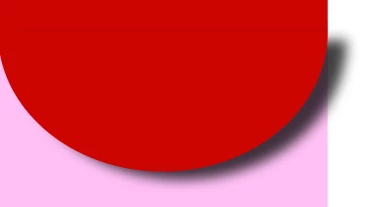
 

Thanks for any help!

Alberto

This topic has been closed for replies.
Correct answer Jacob Bugge

Hi Jacob,

Thanks for your kind reply.

I am just a beginner so it happens that I have difficulties in understanding certain steps (which, for others, might seem obvious :D).

Have a nice day and thanks again 🙂

Alberto


You are welcome, Alberto.


I tried to present my Blend suggestion in your distribute thread colourfully illustrated.

3 replies

Fasih K.
Inspiring
September 6, 2022

Just create and shape with same dimesions as the object and clip it inside.

Known Participant
September 8, 2022

Dear Community,

I solved it in a different way.

I just made another layer, with the drapes, a rectangle, and made a clipping mask there.

The result is like I wanted 🙂

I do not know what was going wrong before 😞

Here is the result:

1. Layers

2. Result:

Thanks everyone for your help, have a nice day 🙂

P.S. I' ll be going to a foam party with my little boy later on, hope to get full of foam 🙂

Alberto

Jacob Bugge
Community Expert
Community Expert
September 8, 2022

Alberto,


Thank you for sharing.


As I understand it, you made a new rectangle with exactly the same size and position as the CandyShopOutline.


My suggestion was to simply use a copy of the CandyShopOutline as that rectangle already in the right size and place, then moved up above the DrapesBottom in the Layers panel to get the right stacking order for the Mask.


pixxxelschubser
Community Expert
Community Expert
September 5, 2022

Yes.

All kind of masks:

  • clipping mask
  • draw inside and
  • opacity mask

will give you the desired result.

😉

Known Participant
September 6, 2022

UPDATE: I do not manage to do it in my project.

I seem not to understand where to put the clipping path and am not able to understand what the final result would be.

The project looks like this:

I want to eliminate the shadow projecting beyond the pink shape.

Thanks,

Alberto

Jacob Bugge
Community Expert
Community Expert
September 6, 2022

Alberto,


You can do this in the Layers panel:


1) Click the circle to the right at the CandyShopOutline (the top one, you have a Group with just that path), then Ctrl/Cmd+C (hold Ctrl/Cmd and press C), then ClickDrag the new Group upwards to be just above the DrapesBottom Group;

2) ShiftClick the circel to the right of the DrapesBottom Group so that both the CandyShopOutline Group and the DrapesBottom Group are selected;

3) Hold Ctrl/Cmd and press 7 to make the Clipping Mask.


Jacob Bugge
Community Expert
Community Expert
September 5, 2022

Alberto,


A path with the shape of the lilac background on top can serve as a Clipping Path for the shadow (and the object casting it): select them and Ctrl/Cmd+7.


Known Participant
September 5, 2022

Hi Jacob,


I could not understand your answer 😞

What should I select?

Thanks,

Alberto