
Answered
How to delete specific Artboard in illustrator using script
Here u can see 4 art boards on attached screenshot, but i want to delete 1,3,4 art boards
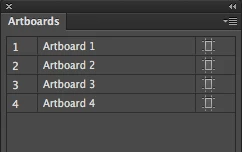
i like to work with art board 2

Here u can see 4 art boards on attached screenshot, but i want to delete 1,3,4 art boards
i like to work with art board 2
just wrap Alexander's script in a do javascript to incorporate it into your applescript workflow.
tell application "Adobe Illustrator"
do javascript " function removeArtboards ( arr ) {
var i = arr.length; while ( i-- ) activeDocument.artboards[ arr[i] ].remove();
}
removeArtboards( [0,2,3] ); "
end tell
Already have an account? Login
Enter your E-mail address. We'll send you an e-mail with instructions to reset your password.


 AdChoices