d0v3
Participating Frequently
May 28, 2023
Answered

How to do this effect and shape on illustrator or photoshop ?

  • May 28, 2023
  • 1 reply
  • 485 views

Hello everybody,


I'm a beginner, and i would like to know how to do this effect in both software (photoshop and illustrator).


I know how to use blur, gradient and masks, but it always appears differently.... i don't have this intense circle at the bottom.


Thank you very much for your help.


This topic has been closed for replies.
Correct answer Monika Gause

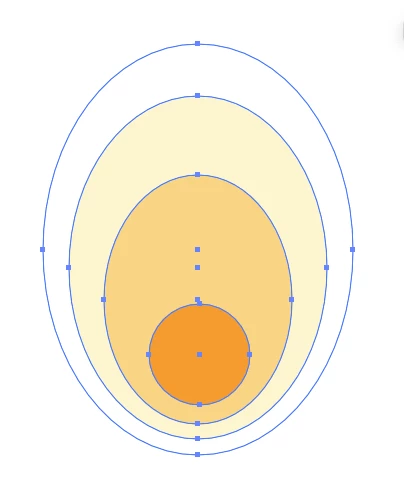
In Illustrator try this.

Create a couple of shapes:

Select them and blend

1 reply

Monika Gause
Community Expert
Monika GauseCommunity ExpertCorrect answer
Community Expert
May 28, 2023

In Illustrator try this.

Create a couple of shapes:

Select them and blend

d0v3
d0v3Author
Participating Frequently
May 28, 2023

Wow! You're good 😊


An answer with illustrations.. you're the best


Thank you very much !!

Monika Gause
Community Expert
Community Expert
May 28, 2023

You're welcome.

You might want to export the result as pixels. Maybe edit in Photoshop, add blur and/or noise