
eaaslee
Participant
July 6, 2018
Answered

How to enlarge / explode artwork
  • July 6, 2018
  • 2 replies
  • 727 views

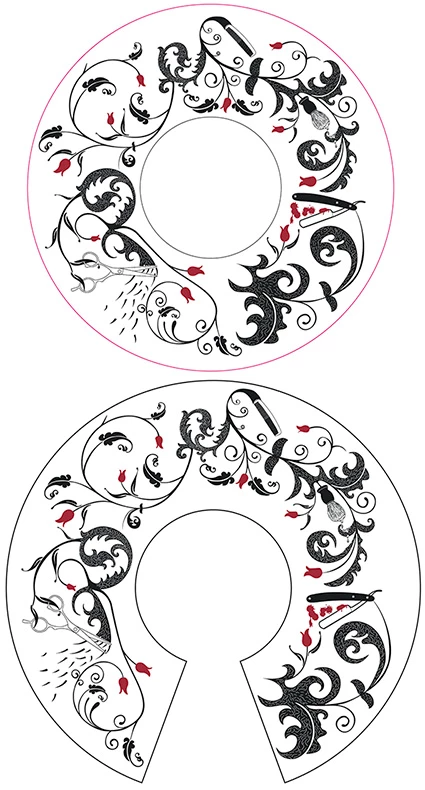
Has anyone come across a way that I can take a file like the top one and expand it to the bottom image, this is to fit a tapered bowl and although I was able to split this file into three parts which were each enlarged and rotated to fit I am trying to find a cleaner way to do this.

The file must stay as an editable vector file which is why I'm doing this in Illustrator.

Any suggestions will be greatly appreciated.

This topic has been closed for replies.
Correct answer Kurt Gold

There is no automatic way to do that.

You will have to carefully rearrange the composition.

2 replies

KShinabery212
Community Expert
Community Expert
July 9, 2018

To be honest....

I would just take the old image and make it a template.  Then try to replicate the design in the expanded format.  Granted you might have to rotate the template little by little.  But to me that would be the easiest solution.  This design does not look so complicated where it would take millions of hours to recreate.

Let's connect on LinkedIn. https://www.linkedin.com/in/kshinabery/
eaaslee
eaasleeAuthor
Participant
July 10, 2018

No, this one was not that difficult as I was able to split it into three parts which could then be manipulated individually. But I was looking for a more automated method so that I could are reliably replicate the procedure. The next time I'm sent files for this they may not be as simple.

Kurt Gold
Community Expert
Kurt GoldCommunity ExpertCorrect answer
Community Expert
July 6, 2018

There is no automatic way to do that.

You will have to carefully rearrange the composition.

eaaslee
eaasleeAuthor
Participant
July 9, 2018

Thanks Kurt, that's what I have found so far, just the stubborn part of me thinks there should be a way to select as a group and pull apart the two anchor points, or something like that. Maybe one day.

Thanks for giving it a look though.