
Participant
July 9, 2025
Answered

How to Envelope Text using Mesh

  • July 9, 2025
  • 2 replies
  • 225 views

Good day!

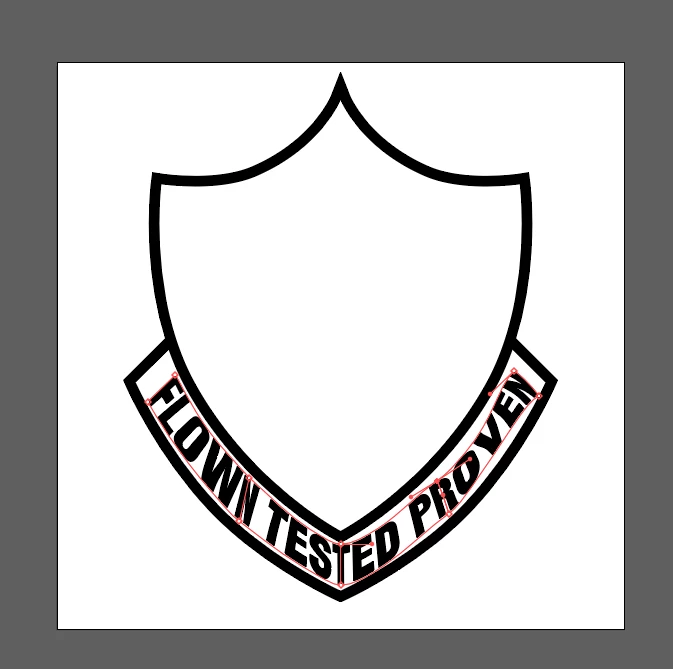
I've been stuck on creating this mesh and editing each points and curves and still end up with distorted text. Is there a better way on how I can do this? I'm creating a template so that I can just edit the text whenever.
 

Correct answer Monika Gause

I think I would make this separately for each of the sides.


And then: I would first draw the shape of the envelope, then use that to distort the text.

And: The length of the handles matters.


https://youtu.be/AXMHWDRcv_g


2 replies

Kurt Gold
Community Expert
Community Expert
July 9, 2025

If I were asked to create something similar that should be (1) precise, (2) legible and (3) pleasant, I would not use envelopes for this specific emblem shape.


I would do it either manually by carefully rotating single letters or, if applicable, by using custom Art Brushes. Type on a Path may also be appropriate.


Of course, you may think that's laborious and you may be right to think so, but it's a valid suggestion, probably.

Monika Gause
Community Expert
Monika GauseCommunity ExpertCorrect answer
Community Expert
July 9, 2025

I think I would make this separately for each of the sides.


And then: I would first draw the shape of the envelope, then use that to distort the text.

And: The length of the handles matters.


https://youtu.be/AXMHWDRcv_g