
Inspiring
March 4, 2021
Answered

How to execute this type outline/shadow effect

  • March 4, 2021
  • 1 reply
  • 360 views

I was font shopping yesterday and this caught my eye:



I don't know if I like the fuzzy black shadow in the upper half, but I definitely like the sharp white outline on the bottom half. Any thoughts on how to do this? I posted the question in InDesign but got no answers, so perhaps it needs to be styled in Illustrator and then exported?
This topic has been closed for replies.
Correct answer Doug A Roberts

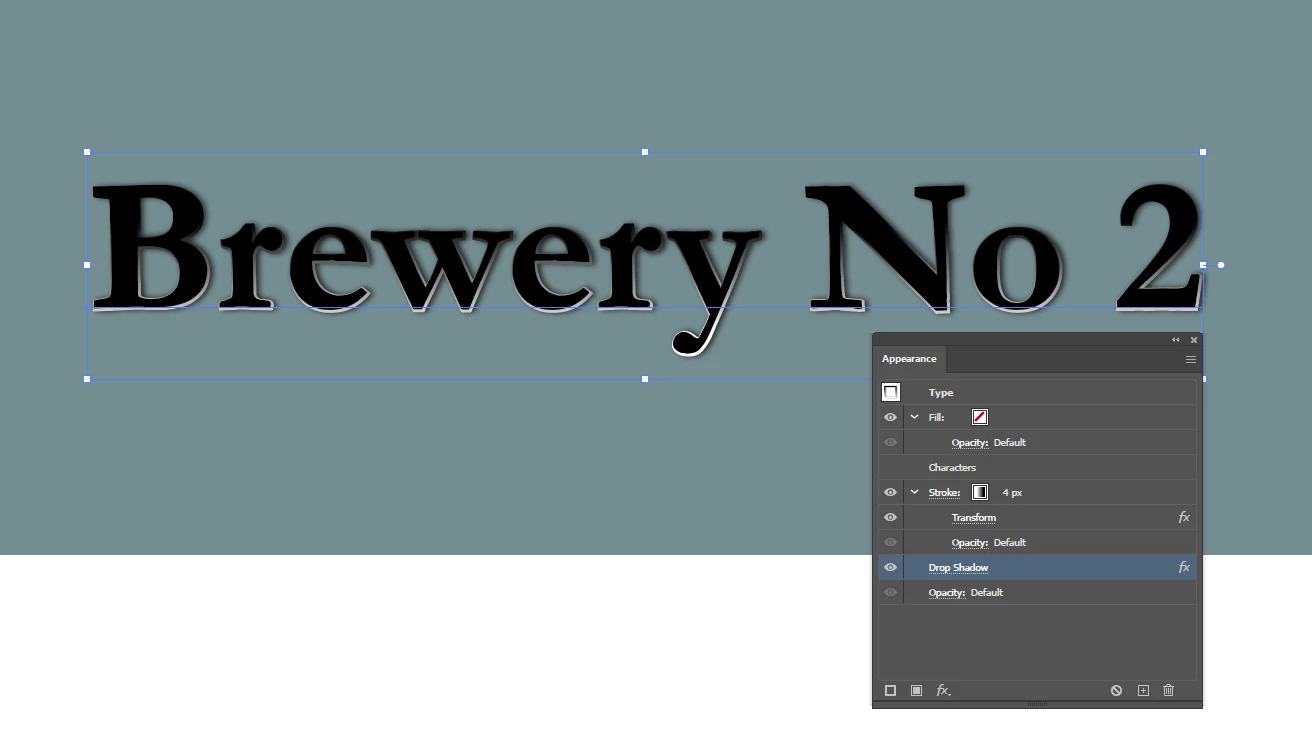
You could add a stroke with a gradient below the text appearance:

This particular one goes from white to black; it might also be worth trying white to background colour/transparent to see what best matches the look you're after. I also offset it slightly and added the drop shadow for completeness, but you might omit or tweak these if it doesn't work for you.

1 reply

Doug A Roberts
Community Expert
Doug A RobertsCommunity ExpertCorrect answer
Community Expert
March 4, 2021

You could add a stroke with a gradient below the text appearance:

This particular one goes from white to black; it might also be worth trying white to background colour/transparent to see what best matches the look you're after. I also offset it slightly and added the drop shadow for completeness, but you might omit or tweak these if it doesn't work for you.