
Answered
How to fill two objects with same contour in two different colors?
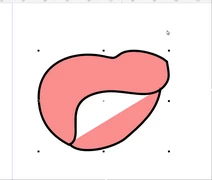
I have same problem in Corel and AI. I create two objects with pen tool, having same countur and want to fill it in two different colors. My result you can see below. I can create two different separate objects and then combine them but it's more longer. Is there any way to speed up this process?
 AdChoices