Exit
  • Global community
    • Language:
      • Deutsch
      • English
      • Español
      • Français
      • Português
  • 日本語コミュニティ
  • 한국 커뮤니티
0

How to freely distort text like a single object

New Here ,
Sep 16, 2020 Sep 16, 2020

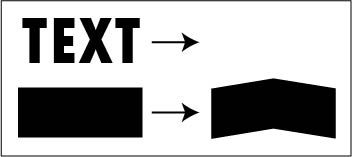
I've attached a photo of an example of what I want to do. Basically, I want to know how I can distort a block of text into the shape shown represented by black rectangles. Can't seem to get it to work with the transform tool.


Distort text.jpg

TOPICS
Draw and design , Tools , Type
487
Translate
Report
Community guidelines
Be kind and respectful, give credit to the original source of content, and search for duplicates before posting. Learn more
community guidelines

correct answers 1 Correct answer

LEGEND , Sep 16, 2020 Sep 16, 2020

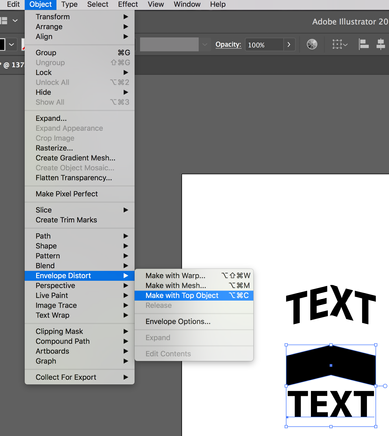
Make sure your black shape is above your text in the layers pallet, then chose Object > Envelope Distort > Make with Top Object. (My result is shown above the parts)

Screen Shot 2020-09-16 at 3.29.02 PM.png

Translate
Adobe
LEGEND ,
Sep 16, 2020 Sep 16, 2020

Make sure your black shape is above your text in the layers pallet, then chose Object > Envelope Distort > Make with Top Object. (My result is shown above the parts)

Screen Shot 2020-09-16 at 3.29.02 PM.png

Translate
Report
Community guidelines
Be kind and respectful, give credit to the original source of content, and search for duplicates before posting. Learn more
community guidelines
New Here ,
Sep 16, 2020 Sep 16, 2020
LATEST

That is exactly what I needed. Thanks so much SJRiegel!

Translate
Report
Community guidelines
Be kind and respectful, give credit to the original source of content, and search for duplicates before posting. Learn more
community guidelines