
Participant
March 23, 2018
Answered

How to get a transparent Artboard for Vector logo creation?

  • March 23, 2018
  • 5 replies
  • 10878 views

Hi guys,

I've opened a new document in AI, but the background is white. I'm really new to this sorry, could someone tell me how to make it transparent? I've created what I would like to as a vector, but when I save it as an AI file it keeps the white background.

Thanks everyone!
This topic has been closed for replies.
Correct answer Doug A Roberts

ok i think i know what's going on.

you've got a PNG that you're dropping into Illustrator and using Image Trace. then you save the AI file and see white where transparency was in the PNG.

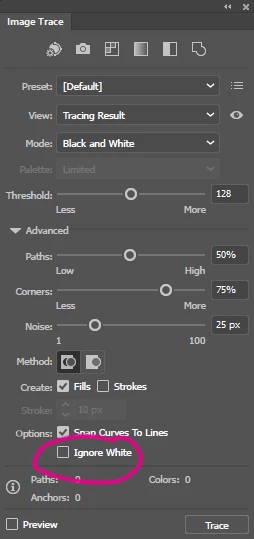
this is because image trace is generating a white fill in place of transparency. to avoid this, check 'ignore white' in the image trace panel:

please try and include your full workflow in future posts because otherwise it's very difficult for anyone else to see the whole picture.

5 replies

Community Expert
March 23, 2018

in artboard white is not white, it's transparent. only if you need a logo just  click on the logo then go to file menu, click export and export assets. Then it will show you settings choose png and everything will be great

Participant
March 23, 2018

Ah right, ok, thanks guys.

I was looking through the file explorer on my Mac. The original PNG has no background but when I scroll to the AI file it shows a white background. Guessing when I then use that though the white will disappear?

When I click show transparency grid I still have a white artboard, but everything around it shows the grid. Is that right?

Thanks guys, sorry I know proper early doors questions!!

Jacob Bugge
Community Expert
Community Expert
March 23, 2018

Tom,

I've created what I would like to as a vector, but when I save it as an AI file it keeps the white background.

The original PNG has no background

There is a certain contrast between the two statements.

PNG is a raster format, which can be saved/exported with or without transparency; obviously, you should tick Transparency (and use PNG24(32)).

sishamIAGD
Community Expert
Community Expert
March 23, 2018

The white is just the artboard, it won't have a background only the logo you have created will come through on anything you bring it into like indesign/photoshop, etc.

Doug A Roberts
Community Expert
Community Expert
March 23, 2018

it is already transparent. the white is just there for display purposes. what are you expecting to see instead? go to View > Show Transparency Grid if you'd rather have that.

how are you determining that your saved AI file has a white background?

Monika Gause
Community Expert
Community Expert
March 23, 2018

There is no background in vector images, unless you create one.

Turn on View > Transparency preview.