
Copy link to clipboard
Copied
hi all,
how to retrieve the document raster effect details
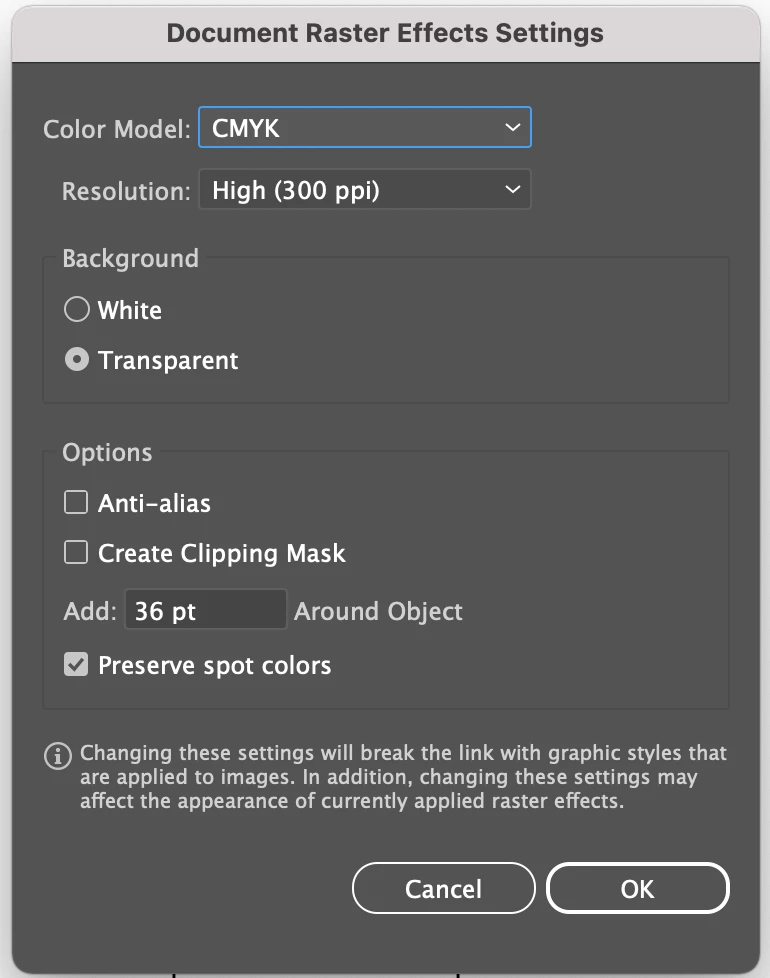
these are the document raster effect details which i want to retrieve which is shown in the above screenshot.
if anyone know the solution to get this through c++ code in illustrator sdk using suites .
please kindly provide solution for this, if i get code to get this that will be more helpfull for me.
Thank you
Copy link to clipboard
Copied
hi @CarlosCanto is there any way to get document raster effect details through illustrator sdk suites using c++ ?
Copy link to clipboard
Copied
The document raster effects settings are stored in the document's dictionary, in another dictionary with the key string "AI Auto Rasterize". You can see its various entries by saving an Illustrator document without compression, opening it in a text editor, and searching for that string. You will see something like:
%_/Dictionary :
%_36 /Real (padd) ,
%_300 /Int (dpi.) ,
%_5 /Int (colr) ,
%_0 /Bool (mask) ,
%_1 /Bool (spot) ,
%_0 /Bool (alis) ,
%_; (AI Auto Rasterize) ,
So to get the resolution, say, you would use code as follows (error checking removed):
ai_long_t resolution = 72;
AIDictionaryRef docDict = NULL;
sAIDocument->GetDictionary( &docDict );
AIDictionaryRef rasterDict = NULL;
sAIDictionary->GetDictEntry( docDict, sAIDictionary->Key( "AI Auto Rasterize" ), &rasterDict );
sAIDictionary->GetIntegerEntry( rasterDict, sAIDictionary->Key( "dpi." ), &resolution );
sAIDictionary->Release( rasterDict );
sAIDictionary->Release( docDict );
Find more inspiration, events, and resources on the new Adobe Community
Explore Now