Known Participant
March 6, 2025
Answered

How to get exact left, top, width, height for selected items using extendscript?

  • March 6, 2025
  • 4 replies
  • 2184 views

Hi,


I need to get exact left, top, width, height for selected items using extendscript.

i try,


var selectedItems = app.activeDocument.selection;
var item = selectedItems[0];

// Get the bounds of the selected items
var bounds = item.geometricBounds;

var left = bounds[0];
var top = bounds[1];
var right = bounds[2];
var bottom = bounds[3];

// Calculate width and height
var width = Math.abs(right - left);
var height = Math.abs(top - bottom);

left: 238.013587617332
top: 583.391458053209
right: 345.268957635682
bottom: 526.611861697349
width: 107.255370018351
height: 56.7795963558601


but the values are differenct. selected item contains pathitem and 3 clip group items.


Please help to get correct value(left, top, width and height)..

Correct answer m1b

Hi @psar12345, calculating the exact bounds of a page item is surprisingly involved. I wrote a function that makes a valiant attempt at doing it. You can see it working in the following demo script. The function `getItemBoundsIllustrator` returns [L, T, R, B]. Give it a try if you like.

- Mark


/**
 * @file Get Item Bounds.js
 *
 * Demonstration of calculating the bounds
 * of the selected item(s) and draws a
 * box to show the bounds.
 *
 * @author m1b
 * @version 2025-03-07
 */
(function () {

    // enum to make the function call below more readable
    var BoundsType = {
        GEOMETRIC_BOUNDS: true,
        VISIBLE_BOUNDS: false,
    };

    var doc = app.activeDocument;

    if (0 === doc.selection.length)
        return alert('Please select and item and try again.');

    // calculate the bounds of the selection
    var bounds = getItemBoundsIllustrator(doc.selection, BoundsType.VISIBLE_BOUNDS);

    if (bounds)
        // for demonstration purposes, draw a box to show bounds
        var box = drawRectangle(doc, bounds, { opacity: 30, fillColor: makeColor([255, 50, 150]) });

})();

/**
 * Draws a rectangle to the document.
 * @param {Document|Layer|GroupItem} container - an Illustrator container.
 * @param {Array<Number>} bounds - [T, L, B, R].
 * @param {Object} props - properties to assign to the rectangle.
 * @return {PathItem} - the rectangle.
 */
function drawRectangle(container, bounds, properties) {

    properties = properties || {};

    var rectangle = container.pathItems.rectangle(bounds[1], bounds[0], bounds[2] - bounds[0], -(bounds[3] - bounds[1])); // TLWH

    // defaults
    rectangle.filled = true;
    rectangle.stroked = false;

    // apply properties
    for (var key in properties)
        if (properties.hasOwnProperty(key))
            rectangle[key] = properties[key];

    return rectangle;

};


/**
 * Return an RGB color.
 * @param {Array<Number>} breakdown - the color breakdown.
 * @returns {RGBColor}
 */
function makeColor(breakdown) {

    var colr = new RGBColor();
    colr.red = breakdown[0];
    colr.green = breakdown[1];
    colr.blue = breakdown[2];

    return colr;

};

/**
 * Returns bounds of item(s).
 * @author m1b
 * @version 2025-03-11
 * @param {PageItem|Array<PageItem>} item - an Illustrator PageItem or array of PageItems.
 * @param {Boolean} [geometric] - if false, returns visible bounds.
 * @param {Array} [bounds] - private parameter, used when recursing.
 * @returns {Array} - the calculated bounds [L, T, R, B].
 */
function getItemBoundsIllustrator(item, geometric, bounds) {

    var newBounds = [],
        boundsKey = geometric ? 'geometricBounds' : 'visibleBounds';

    if (undefined == item)
        return;

    if (
        item.typename == 'GroupItem'
        || item.constructor.name == 'Array'
    ) {

        var children = item.typename == 'GroupItem' ? item.pageItems : item,
            contentBounds = [],
            isClippingGroup = (item.hasOwnProperty('clipped') && item.clipped == true),
            clipBounds;

        for (var i = 0, child; i < children.length; i++) {

            child = children[i];

            if (
                child.hasOwnProperty('clipping')
                && true === child.clipping
                && true !== child.stroked
                && true !== child.filled
            )
                // the clipping item
                clipBounds = child.geometricBounds;

            else
                contentBounds.push(getItemBoundsIllustrator(child, geometric, bounds));

        }

        newBounds = combineBounds(contentBounds);

        if (
            isClippingGroup
            && clipBounds
            && newBounds
        )
            newBounds = intersectionOfBounds([clipBounds, newBounds]);

    }

    else if (
        'TextFrame' === item.constructor.name
        && TextType.AREATEXT !== item.kind
    ) {

        // get bounds of outlined text
        var dup = item.duplicate().createOutline();
        newBounds = dup[boundsKey];
        dup.remove();

    }

    else if (item.hasOwnProperty(boundsKey)) {

        newBounds = item[boundsKey];

    }

    // `bounds` will exist if this is a recursive execution
    bounds = (undefined == bounds)
        ? bounds = newBounds
        : bounds = combineBounds([newBounds, bounds]);

    return bounds;

};

/**
 * Returns the combined bounds of all bounds supplied.
 * Works with Illustrator or Indesign bounds.
 * @author m1b
 * @version 2025-03-11
 * @param {Array<bounds>} boundsArray - an array of bounds [L, T, R, B] or [T, L , B, R].
 * @returns {bounds?} - the combined bounds.
 */
function combineBounds(boundsArray) {

    var combinedBounds = boundsArray[0],
        comparator;

    if (/indesign/i.test(app.name))
        comparator = [Math.min, Math.min, Math.max, Math.max];

    else
        comparator = [Math.min, Math.max, Math.max, Math.min];

    // iterate through the rest of the bounds
    for (var i = 1; i < boundsArray.length; i++) {

        var bounds = boundsArray[i];

        if (!bounds)
            continue;

        combinedBounds = [
            comparator[0](combinedBounds[0], bounds[0]),
            comparator[1](combinedBounds[1], bounds[1]),
            comparator[2](combinedBounds[2], bounds[2]),
            comparator[3](combinedBounds[3], bounds[3]),
        ];

    }

    return combinedBounds;

};

/**
 * Returns the overlapping rectangle
 * of two or more rectangles.
 * NOTE: Returns undefined if ANY
 * rectangles do not intersect.
 * @author m1b
 * @version 2024-09-05
 * @param {Array<bounds>} arrayOfBounds - an array of bounds [L, T, R, B] or [T, L , B, R].
 * @returns {bounds?} - intersecting bounds.
 */
function intersectionOfBounds(arrayOfBounds) {

    var comparator;

    if (/indesign/i.test(app.name))
        comparator = [Math.max, Math.max, Math.min, Math.min];

    else
        comparator = [Math.max, Math.min, Math.min, Math.max];

    // sort a copy of array
    var bounds = arrayOfBounds
        .slice(0)
        .sort(function (a, b) { return b[0] - a[0] || a[1] - b[1] });

    // start with first bounds
    var intersection = bounds.shift(),
        b;

    // compare each bounds, getting smaller
    while (b = bounds.shift()) {

        // if doesn't intersect, bail out
        if (!boundsDoIntersect(intersection, b))
            return;

        intersection = [
            comparator[0](intersection[0], b[0]),
            comparator[1](intersection[1], b[1]),
            comparator[2](intersection[2], b[2]),
            comparator[3](intersection[3], b[3]),
        ];

    }

    return intersection;

};

/**
 * Returns true if the two bounds intersect.
 * @author m1b
 * @version 2024-03-10
 * @param {Array} bounds1 - bounds array.
 * @param {Array} bounds2 - bounds array.
 * @param {Boolean} [TLBR] - whether bounds arrays are interpreted as [T, L, B, R] OR [L, T, R, B] (default: based on app).
 * @returns {Boolean}
 */
function boundsDoIntersect(bounds1, bounds2, TLBR) {

    if (undefined == TLBR)
        TLBR = (/indesign/i.test(app.name));

    return !(

        TLBR

            // TLBR
            ? (
                bounds2[0] > bounds1[2]
                || bounds2[1] > bounds1[3]
                || bounds2[2] < bounds1[0]
                || bounds2[3] < bounds1[1]
            )

            // LTRB
            : (
                bounds2[0] > bounds1[2]
                || bounds2[1] < bounds1[3]
                || bounds2[2] < bounds1[0]
                || bounds2[3] > bounds1[1]
            )
    );

};


Edit 2025-03-11: added handling for empty clipping groups.

4 replies

renél80416020
Inspiring
March 15, 2025

Bonjour @psar12345 ,

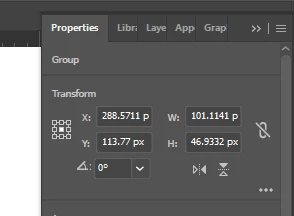
j'ai une remarque à formuler sur le fait que certaines valeurs ne correspondent pas.

ex pour gauche (vous avez sélectionner le centre de l'objet)


René


psar12345Author
Known Participant
March 25, 2025

Hi @renél80416020,


Yes, you are right it is the center reference point.

m1b
Community Expert
m1bCommunity ExpertCorrect answer
Community Expert
March 7, 2025

Hi @psar12345, calculating the exact bounds of a page item is surprisingly involved. I wrote a function that makes a valiant attempt at doing it. You can see it working in the following demo script. The function `getItemBoundsIllustrator` returns [L, T, R, B]. Give it a try if you like.

- Mark


/**
 * @file Get Item Bounds.js
 *
 * Demonstration of calculating the bounds
 * of the selected item(s) and draws a
 * box to show the bounds.
 *
 * @author m1b
 * @version 2025-03-07
 */
(function () {

    // enum to make the function call below more readable
    var BoundsType = {
        GEOMETRIC_BOUNDS: true,
        VISIBLE_BOUNDS: false,
    };

    var doc = app.activeDocument;

    if (0 === doc.selection.length)
        return alert('Please select and item and try again.');

    // calculate the bounds of the selection
    var bounds = getItemBoundsIllustrator(doc.selection, BoundsType.VISIBLE_BOUNDS);

    if (bounds)
        // for demonstration purposes, draw a box to show bounds
        var box = drawRectangle(doc, bounds, { opacity: 30, fillColor: makeColor([255, 50, 150]) });

})();

/**
 * Draws a rectangle to the document.
 * @param {Document|Layer|GroupItem} container - an Illustrator container.
 * @param {Array<Number>} bounds - [T, L, B, R].
 * @param {Object} props - properties to assign to the rectangle.
 * @return {PathItem} - the rectangle.
 */
function drawRectangle(container, bounds, properties) {

    properties = properties || {};

    var rectangle = container.pathItems.rectangle(bounds[1], bounds[0], bounds[2] - bounds[0], -(bounds[3] - bounds[1])); // TLWH

    // defaults
    rectangle.filled = true;
    rectangle.stroked = false;

    // apply properties
    for (var key in properties)
        if (properties.hasOwnProperty(key))
            rectangle[key] = properties[key];

    return rectangle;

};


/**
 * Return an RGB color.
 * @param {Array<Number>} breakdown - the color breakdown.
 * @returns {RGBColor}
 */
function makeColor(breakdown) {

    var colr = new RGBColor();
    colr.red = breakdown[0];
    colr.green = breakdown[1];
    colr.blue = breakdown[2];

    return colr;

};

/**
 * Returns bounds of item(s).
 * @author m1b
 * @version 2025-03-11
 * @param {PageItem|Array<PageItem>} item - an Illustrator PageItem or array of PageItems.
 * @param {Boolean} [geometric] - if false, returns visible bounds.
 * @param {Array} [bounds] - private parameter, used when recursing.
 * @returns {Array} - the calculated bounds [L, T, R, B].
 */
function getItemBoundsIllustrator(item, geometric, bounds) {

    var newBounds = [],
        boundsKey = geometric ? 'geometricBounds' : 'visibleBounds';

    if (undefined == item)
        return;

    if (
        item.typename == 'GroupItem'
        || item.constructor.name == 'Array'
    ) {

        var children = item.typename == 'GroupItem' ? item.pageItems : item,
            contentBounds = [],
            isClippingGroup = (item.hasOwnProperty('clipped') && item.clipped == true),
            clipBounds;

        for (var i = 0, child; i < children.length; i++) {

            child = children[i];

            if (
                child.hasOwnProperty('clipping')
                && true === child.clipping
                && true !== child.stroked
                && true !== child.filled
            )
                // the clipping item
                clipBounds = child.geometricBounds;

            else
                contentBounds.push(getItemBoundsIllustrator(child, geometric, bounds));

        }

        newBounds = combineBounds(contentBounds);

        if (
            isClippingGroup
            && clipBounds
            && newBounds
        )
            newBounds = intersectionOfBounds([clipBounds, newBounds]);

    }

    else if (
        'TextFrame' === item.constructor.name
        && TextType.AREATEXT !== item.kind
    ) {

        // get bounds of outlined text
        var dup = item.duplicate().createOutline();
        newBounds = dup[boundsKey];
        dup.remove();

    }

    else if (item.hasOwnProperty(boundsKey)) {

        newBounds = item[boundsKey];

    }

    // `bounds` will exist if this is a recursive execution
    bounds = (undefined == bounds)
        ? bounds = newBounds
        : bounds = combineBounds([newBounds, bounds]);

    return bounds;

};

/**
 * Returns the combined bounds of all bounds supplied.
 * Works with Illustrator or Indesign bounds.
 * @author m1b
 * @version 2025-03-11
 * @param {Array<bounds>} boundsArray - an array of bounds [L, T, R, B] or [T, L , B, R].
 * @returns {bounds?} - the combined bounds.
 */
function combineBounds(boundsArray) {

    var combinedBounds = boundsArray[0],
        comparator;

    if (/indesign/i.test(app.name))
        comparator = [Math.min, Math.min, Math.max, Math.max];

    else
        comparator = [Math.min, Math.max, Math.max, Math.min];

    // iterate through the rest of the bounds
    for (var i = 1; i < boundsArray.length; i++) {

        var bounds = boundsArray[i];

        if (!bounds)
            continue;

        combinedBounds = [
            comparator[0](combinedBounds[0], bounds[0]),
            comparator[1](combinedBounds[1], bounds[1]),
            comparator[2](combinedBounds[2], bounds[2]),
            comparator[3](combinedBounds[3], bounds[3]),
        ];

    }

    return combinedBounds;

};

/**
 * Returns the overlapping rectangle
 * of two or more rectangles.
 * NOTE: Returns undefined if ANY
 * rectangles do not intersect.
 * @author m1b
 * @version 2024-09-05
 * @param {Array<bounds>} arrayOfBounds - an array of bounds [L, T, R, B] or [T, L , B, R].
 * @returns {bounds?} - intersecting bounds.
 */
function intersectionOfBounds(arrayOfBounds) {

    var comparator;

    if (/indesign/i.test(app.name))
        comparator = [Math.max, Math.max, Math.min, Math.min];

    else
        comparator = [Math.max, Math.min, Math.min, Math.max];

    // sort a copy of array
    var bounds = arrayOfBounds
        .slice(0)
        .sort(function (a, b) { return b[0] - a[0] || a[1] - b[1] });

    // start with first bounds
    var intersection = bounds.shift(),
        b;

    // compare each bounds, getting smaller
    while (b = bounds.shift()) {

        // if doesn't intersect, bail out
        if (!boundsDoIntersect(intersection, b))
            return;

        intersection = [
            comparator[0](intersection[0], b[0]),
            comparator[1](intersection[1], b[1]),
            comparator[2](intersection[2], b[2]),
            comparator[3](intersection[3], b[3]),
        ];

    }

    return intersection;

};

/**
 * Returns true if the two bounds intersect.
 * @author m1b
 * @version 2024-03-10
 * @param {Array} bounds1 - bounds array.
 * @param {Array} bounds2 - bounds array.
 * @param {Boolean} [TLBR] - whether bounds arrays are interpreted as [T, L, B, R] OR [L, T, R, B] (default: based on app).
 * @returns {Boolean}
 */
function boundsDoIntersect(bounds1, bounds2, TLBR) {

    if (undefined == TLBR)
        TLBR = (/indesign/i.test(app.name));

    return !(

        TLBR

            // TLBR
            ? (
                bounds2[0] > bounds1[2]
                || bounds2[1] > bounds1[3]
                || bounds2[2] < bounds1[0]
                || bounds2[3] < bounds1[1]
            )

            // LTRB
            : (
                bounds2[0] > bounds1[2]
                || bounds2[1] < bounds1[3]
                || bounds2[2] < bounds1[0]
                || bounds2[3] > bounds1[1]
            )
    );

};


Edit 2025-03-11: added handling for empty clipping groups.
psar12345Author
Known Participant
March 7, 2025

Hi @m1b,


Thanks for your support

m1b
Community Expert
Community Expert
March 15, 2025

s


Interesting! According to the predicate && newBounds, if `newBounds` is undefined, the next line shouldn't run and shouldn't throw an error. Can you share a sample document that shows the problem?

Inspiring
March 6, 2025

If you need to determine the bounds of what you perceive, you should think about what you are actually looking at and why that is the case. Are your perceivable bounds determined by a clipping mask somewhere within the group etc?

Inspiring
March 6, 2025

geometricBounds takes all nested items into account. The bounds you're getting is all items, even those nested deep inside groups and clipgroups.