
Participant
March 15, 2018
Answered

how to get rid of visible unintended outlines/edges?

  • March 15, 2018
  • 2 replies
  • 1343 views

Hi there,

I can't make out an easy way to get rid of edges that are unintended.
although my geometric shape aline flush next to each other in my .ai .jpg and pdfs are visible unwanted borderlines.
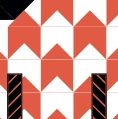
Any idea how to fix this?
Except going into all the details and merge the shapes together one by one?

    This topic has been closed for replies.
    Correct answer erik norden

    Hello Srishti,

    Well, I rebuilt the illustration and merged the the object together so I got rid off those visible lines.
    However thanks to Monika for her advice!

    thank you very much your endeavours !

    2 replies

    Srishti Bali
    Community Manager
    Community Manager
    May 15, 2018

    Hi Erik,

    I would like to know if the steps suggested by Monika worked for you, or the issue still persists.

    Kindly update the discussion if you need further assistance with it.

    Thanks,

    Srishti

    erik nordenAuthorCorrect answer
    Participant
    May 16, 2018

    Hello Srishti,

    Well, I rebuilt the illustration and merged the the object together so I got rid off those visible lines.
    However thanks to Monika for her advice!

    thank you very much your endeavours !

    Srishti Bali
    Community Manager
    Community Manager
    May 16, 2018

    Hi Erik,

    Thanks for sharing the steps with us.

    Regards,

    Srishti

    Monika Gause
    Community Expert
    Community Expert
    March 15, 2018

    WHen you zoom in, do they go away?

    Participant
    March 15, 2018

    they do get away if you are super close.
    So the edges of those shapes match - I think - since point anchor points really lay on one another.
    if I print the files it's good as well - non of these unintended edges appear.
    But exported to .svg for example it's sheer horror.

    Monika Gause
    Community Expert
    Community Expert
    March 15, 2018

    Your initial post did not mention SVG.

    You need to increase the "Decimals" parameter in the options.

    In order to try and fix JPEG, select the "Supersampling" antialiasing.