Inspiring
May 11, 2018
Question

How to get this simple "embossed" effect?

  • May 11, 2018
  • 2 replies
  • 1566 views

I'd like to take a "fleuron" (a printer's "squiggle") from a type family and give it a subtle 3D/embossed effect. This is a screenshot of the outcome I have in mind.
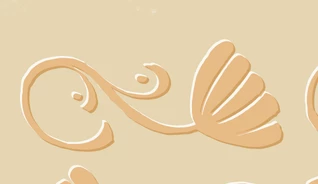
Obviously, the key is a light stroke here and there on the top side, and a dark stroke here and there on the bottom side.

Can anyone tell me how to do that?

    This topic has been closed for replies.

    2 replies

    Ray Yorkshire
    Participating Frequently
    May 11, 2018
    Monika Gause
    Community Expert
    Community Expert
    May 11, 2018

    Apply two more fills to the object via the appearance panel.

    One of them in a lighter color, the other one in a darker color.

    Apply the transform effect to each of those files. Move one fill to the top left and the other oe to the bottom right using its transform effect.