
How to highlighted select a specified layer?
How to select a specified layer with a script? For the same effect as clicking with the mouse, this layer must be highlighted.
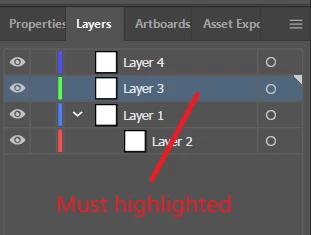
I have tried the following methods, which are not always feasible:
app.activeDocument.activeLayer=app.activeDocument.layers[0]

app.activeDocument.layers[0].hasSelectedArtwork=true
When running the script, if a layer (highlighted) has been selected, they are feasible, but when running the script, if the specified layer had selected but not highlighted ( the mouse focus is not on the layer panel ), they are not feasible (or they have run correctly and selected the specified layer, but the layer is not highlighted).
So, the focus of my question is how to highlight select layers, for the same effect as clicking with the mouse. I do this mainly to run the "Duplicate Layer" command in the layer panel menu. If the layer is not highlighted, the "Duplicate Layer" command is not available even though the layer is already selected.
Looking forward to your response and many Thx for help and ideas.


 AdChoices