
Exit
  • Global community
    • Language:
      • Deutsch
      • English
      • Español
      • Français
      • Português
  • 日本語コミュニティ
  • 한국 커뮤니티
0

How to join open path with closed path
New Here ,
Mar 26, 2020 Mar 26, 2020

dea92adee7362b1bca4731b58cf384c8.png

Hi,


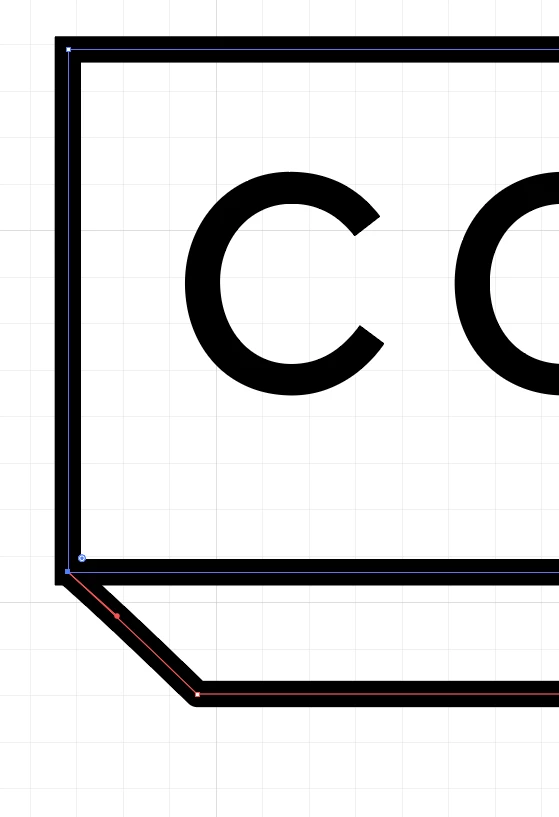
I am trying to create a 3-D text box but can't seem to find a way to join an open path to a closed path to create a seemless corner. Please let me know if you have any suggestions,


Thank you in Advance,


Lola


TOPICS
Draw and design
1.6K
Translate
Report
Community guidelines
Be kind and respectful, give credit to the original source of content, and search for duplicates before posting. Learn more
community guidelines
Adobe
Community Expert ,
Mar 26, 2020 Mar 26, 2020

There is no way of joining those paths as they are, but if you just want the drawing to appear correct, cut the blue path at that point and join it with the red path.

Translate
Report
Community guidelines
Be kind and respectful, give credit to the original source of content, and search for duplicates before posting. Learn more
community guidelines
Community Expert ,
Mar 26, 2020 Mar 26, 2020

Hi. You can't join a close path with an open path. The Join command and tools need open paths.

Marlon Ceballos
Translate
Report
Community guidelines
Be kind and respectful, give credit to the original source of content, and search for duplicates before posting. Learn more
community guidelines
Community Expert ,
Mar 26, 2020 Mar 26, 2020
LATEST

Because your goal is the seamless corner, check this thread for suggestions: https://community.adobe.com/t5/illustrator/how-to-get-rid-of-quot-cat-ears-quot-in-illustrator/m-p/1...

Translate
Report
Community guidelines
Be kind and respectful, give credit to the original source of content, and search for duplicates before posting. Learn more
community guidelines