
Inspiring
December 1, 2022
Answered

How to Keep/Find specific fonts in character panel

  • December 1, 2022
  • 3 replies
  • 1068 views

Hi, I'm looking for a way to quickly locate and use my company's brand fonts. 5 are Adobe fonts, and 6 were purchased through my organization. 


I thought favoriting them in Adobe Fonts would do the trick but even with them favorited online, they are not favorited in llustrator...(?) Plus that is of no help when it comes to the 6 installed fonts. Recent fonts is working ok, but if you don't use a font for a while it falls off, and you may forget about it until you have to dig for it again. 


Can someone please let me know how to keep brand fonts at the top of the type list, or at the least filter them. 
This topic has been closed for replies.
Correct answer Ton Frederiks

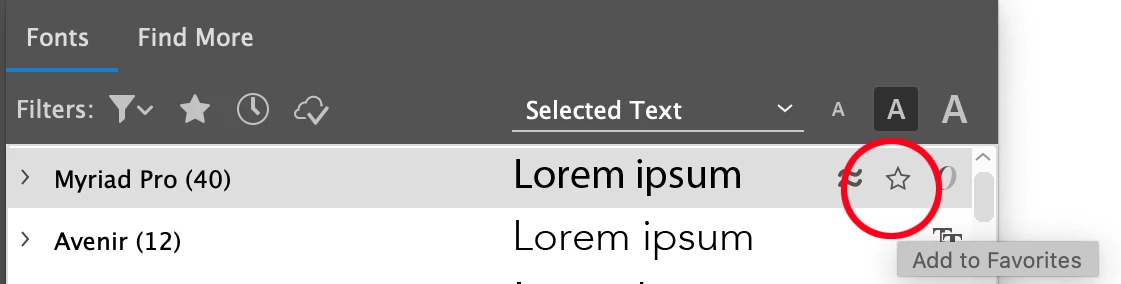
Select a font and the star will appear:

3 replies

Participant
October 15, 2024

mmmmm

pixxxelschubser
Community Expert
Community Expert
December 1, 2022

Which UI scaling have you set? Normally the "Favorite star" is in this position:


[ edited by pixxxelschubser ]

Oops. Too late.

Ton Frederiks
Community Expert
Community Expert
December 1, 2022

Did you try to click the star next to the font name in the Character panle. That makes it a favourite and  those can be filtered.

RachilliAuthor
Inspiring
December 1, 2022

Where is the star?

I thought by favoriting them on the Adobe Font website, it would transfer, no?

Ton Frederiks
Community Expert
Community Expert
December 1, 2022

Ok I finally got it. You can't search for a typeface and hover, you have to find it in the main list.. *sigh*. Still, why does it not pull your favorites from Adobe Fonts?


That sounds like a feature request:

https://illustrator.uservoice.com/