
Participant
April 26, 2020
Answered

How to make a curved shape proportionate on both sides?

  • April 26, 2020
  • 4 replies
  • 4983 views

Hi,


I have a triangle whose sides I want to curve. What is the best way to curve both sides so that they are equal/proportionate to each other? I have attached images below of the shape and how I want to curve it.


Thank you for your time.

This topic has been closed for replies.
Correct answer Ton Frederiks

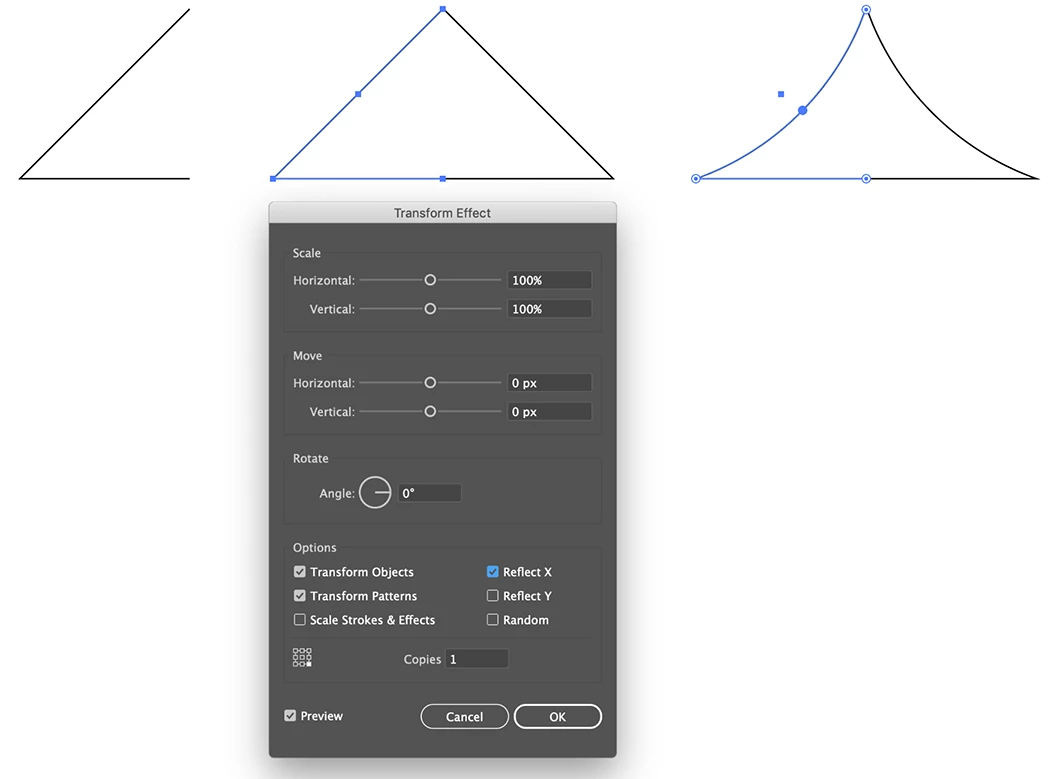
Another way of doing this is with a Transform Effect.

With the Direct Selection Tool select and delete the lower right anchor point.

Effect > Distort & Transform > Transform...

Copies: 1 Reflect X 

Click OK and make the curve.

When finished you can choose Object > Expand Appearance and join the 2 sides.
4 replies

Ashutosh_Mishra
Inspiring
May 30, 2020

Hi there,


Thanks for reaching out. I hope your issue is resolved now. We'd appreciate if you can mark the earlier response correct. You may also share your solution if you did something else to resolve the problem. This will help other users with the similar situation.
If you still have issues, let us know so that we can help you accordingly. Looking forward to your response.


Regards,

Ashutosh

Ton Frederiks
Community Expert
Ton FrederiksCommunity ExpertCorrect answer
Community Expert
April 27, 2020

Another way of doing this is with a Transform Effect.

With the Direct Selection Tool select and delete the lower right anchor point.

Effect > Distort & Transform > Transform...

Copies: 1 Reflect X 

Click OK and make the curve.

When finished you can choose Object > Expand Appearance and join the 2 sides.

tromboniator
Community Expert
Community Expert
April 27, 2020

Assuming an isosceles triangle, which you appear to have:


1. Direct select and delete the straight side to be replaced;


2. Direct select, copy, and paste in front the curved side.


3. With the duplicate side selected, activate the Reflect Tool (for a concave side) or the Rotate Tool (convex), and set the reflection or rotation point at the upper end of the curve, and reflect or rotate so that the lower end of the curve meets the end of the straight side. Smart Guides and/or Snap to Point may be your friends here.


Peter

tromboniator
Community Expert
Community Expert
April 26, 2020

Could you please attach your screenshots with the Insert Photos button, rather than the Insert Links? It is not possible to see them as they are. 


Thanks,
Peter


Participant
April 27, 2020