Participant
February 11, 2019
Answered

How to make flying fabric element

  • February 11, 2019
  • 2 replies
  • 766 views

How can i make a flying fabric vector like this in illustrator/photoshop? specifically, i need the property where the fabric folds over itself and creates shadows, as well as how it seems to cascade over the ampersand element.

There are tutorials online on how to model fabric/satin waves as a texture, but not as an element in itself (in the sense that it doesn't fill the entire page, the edges are visible in order to see how it folds etc.)

Could it possibly be cinema4d or blender? I am convinced its possible in illustrator, and the designer suggested that it was made in illustrator.

It must be possible! Please help!

Baugasm Series - Pack 4 on Behance

This topic has been closed for replies.
Correct answer mikehamm

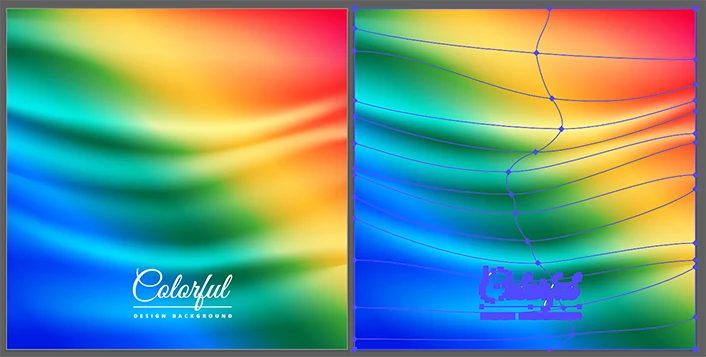
It looks like it's 3 objects that use a gradient mesh. I downloaded a file off of vecteezy.com that sort of shows a fabric-like effect. It uses a mesh for the folds and colors so I don't see why something like you've shown couldn't be created. Though, yeah, it will take some time.

2 replies

mikehammCorrect answer
Inspiring
February 11, 2019

It looks like it's 3 objects that use a gradient mesh. I downloaded a file off of vecteezy.com that sort of shows a fabric-like effect. It uses a mesh for the folds and colors so I don't see why something like you've shown couldn't be created. Though, yeah, it will take some time.

Monika Gause
Community Expert
Community Expert
February 11, 2019

A lot of gradient meshes, blends, overlayed shapes and patience and then you wmight be able to create this kind of illustration in Illustrator. Search for photorealistic illustration.

But maybe that part of the artwork has just been placed in Illustrator?