
December 11, 2017
Answered

How to make Illustrator tells you how far objects are?

  • December 11, 2017
  • 3 replies
  • 666 views

Hello, I'm working with pixels, and I want to know how far each object is from the other, or if they're on the same line or not.

I think such feature called magnetic something because I used to use it on affinity, but I have no idea how to turn on it in illustrator if it's there in the first place.

if it's there, please tell me.

Thanks.

Example: Tow squares, you put side by side, the app shows a line and tells you har each object is from the other.

for example, this picture.
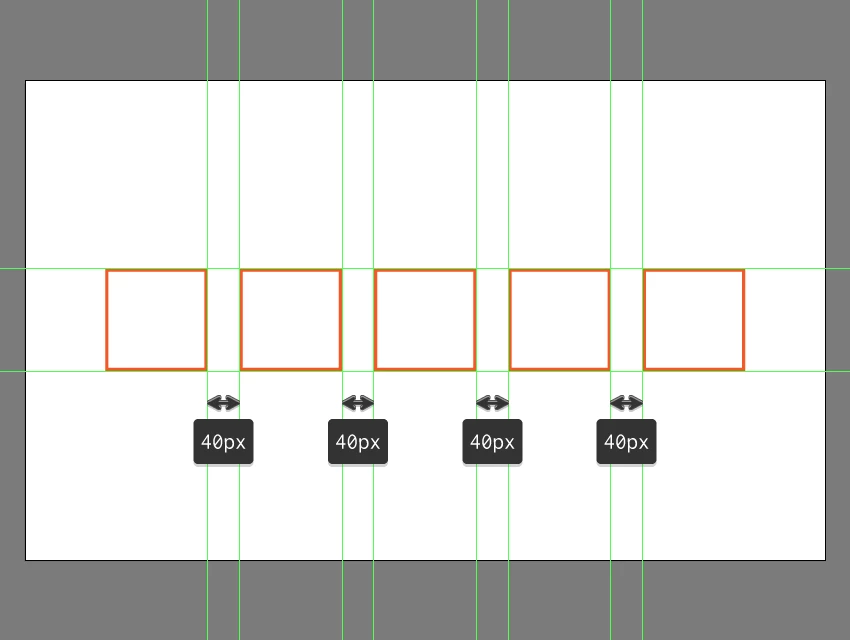
another example

adding-the-second-pair-of-anchor-points-to-the-upper-section-of-batman

    This topic has been closed for replies.
    Correct answer Mike_Gondek10189183

    https://specctr.com/cloud/home

    Will create the dimensions on a separate layer you can hide or print if needed.

    3 replies

    Luke Jennings
    Inspiring
    January 3, 2018

    In Addition to the good info above, you can use the Align tool to align a group of objects and specify the distance between them with the Distribute spacing option.

    Also, Acrobat & Reader have a measure tool that can indicate dimensions as PDF markups. These markups won't appear in Illustrator unless you first optimize the marked-up PDF in Acrobat, (Discard hidden layer content and flatten visible layers) which will break the Illustrator file.

    January 3, 2018

    Thanks, that was so helpful!

    Mike_Gondek10189183
    Community Expert
    Mike_Gondek10189183Community ExpertCorrect answer
    Community Expert
    December 11, 2017

    https://specctr.com/cloud/home

    Will create the dimensions on a separate layer you can hide or print if needed.

    January 3, 2018

    Thanks <3

    Monika Gause
    Community Expert
    Community Expert
    December 11, 2017

    Try the smart guides.

    Turn them on in the View menu

    Set them up using Preferences > Smart guides.