
Known Participant
May 14, 2020
Answered

How to make the border (vignette) for the postcard

  • May 14, 2020
  • 6 replies
  • 4291 views

Hi folks!

The problem is to make a white border for the postcard to make image (or whatever there is) to vanish to the white. How to do it in AI?

I am not sure if I use correct term, in PS I could di it with Camera RAW filter PostCrop Vignette fx, but since the image is in AI, and cut, I am not sure if I can make it in Photoshop. Here is what I look for
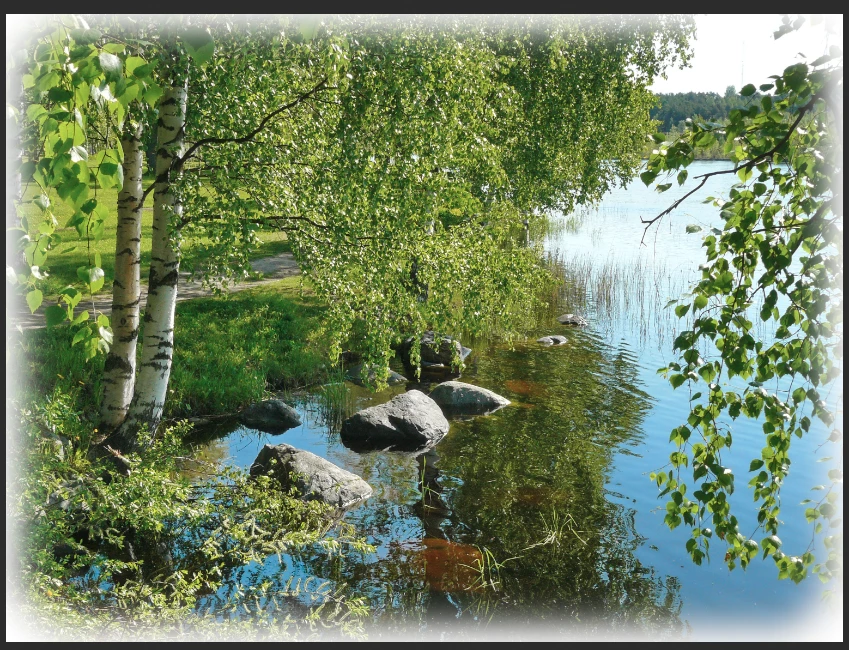


This topic has been closed for replies.
Correct answer Jacob Bugge

mirafoto,


How about Effect>Stylize>Inner Glow?


6 replies

Jacob Bugge
Community Expert
Community Expert
June 3, 2020

mirafoto,


You could make a feature request, I believe.


https://illustrator.uservoice.com/

Jacob Bugge
Community Expert
Community Expert
May 22, 2020

You are welcome, mirafoto.


You can try to  copy the post into this (to the left),


https://translate.google.com


then set that source language (to the left) to English, then set the target language (to the right) to Finnish; Hyvää juhannusta translates to Happy midsummer the other way just fine, so you may easily get there or close enough.


Or, if you (have to) use a Swedish version, you need to choose Swedish of course;.


And in that case you can search for each English term here in the Help pages (empty search, just enter the term),

https://helpx.adobe.com/search-results.html?q=&scope=[%22helpx%22]&subscope=[]&limit=10&start_index=0&sort_orderby=relevancy&sort_order=desc&post_facet_filters={%22applicable_products%22%3A[]}


and then change the language by inserting /se right after .com in the URL, so it begins with


https://helpx.adobe.com/se/search-results.html?


Or you can try to look things up in under SV in this Polyglott kindly shared by Monika,

https://vektorgarten.de/illustrator-polyglott.html

mirafotoAuthor
Known Participant
June 3, 2020
Sure I do, there is no problem for translating things, some problem is to match the translation with Adobe's own translation of these commands to Finnish 😉
Jacob Bugge
Community Expert
Community Expert
May 21, 2020

mirafoto,


For a vanishing/fading to one side you can simply, and reversibly/editably:


1) Create a rectangle spanning the vanishing/fading area of the photo,

2) Apply a default linear Gradient going from black at the edge to white where the vanishing/fading is to end (you can set the angle of the gradient to fit whichever side of the photo you wish);

3) Select both the gradient rectangle from 2) and the photo and in the Transparency palette (flyout) click Make (Opacity) Mask with both Clip and Invert Mask unticked (in the main Transparency palette); the bits in brackets apply to older versions.


This will make the photo vaninsh/fade to full transparency = the white of the paper. On the Artboard you will see the Grid (when shown as in your screenshot) gradually show more and more through the photo towards the edge. There is no need to destroy the artwork by flattening transparency.


The (Opacity) Mask can be released and remade if you wish to make changes.


And you can (still) use a linked photo.


mirafotoAuthor
Known Participant
May 22, 2020

Great! I try it out. All the things have different names in my language, but I try to find them. Thanx a lot for guidance!


mirafotoAuthor
Known Participant
May 21, 2020

What if I need this effect only on one side of the image, to make the image vanish to white?
It is needed for the brochure, where the image takes only half of the page.
Currenty, I have to do it in Photoshop, but every time the design changes I have to re-do it, which is not acceptable.
Thanx a lot


Jacob Bugge
Community Expert
Community Expert
May 14, 2020

You are welcome, mirafoto.


I am afraid you have to set the glow colour.

mirafotoAuthor
Known Participant
May 16, 2020

So glow color cannot be picked, but set manually.

Jacob Bugge
Community Expert
Community Expert
May 16, 2020

Right you are, mirafoto.


You can get many answers through the helpx pages such as this (first hit with a search for inner glow),

https://helpx.adobe.com/illustrator/using/drop-shadows-glows-feathering.html


There are countless small and great limitations, and it is possible to suggest new features (and report bugs),

https://illustrator.uservoice.com/


Jacob Bugge
Community Expert
Jacob BuggeCommunity ExpertCorrect answer
Community Expert
May 14, 2020

mirafoto,


How about Effect>Stylize>Inner Glow?


mirafotoAuthor
Known Participant
May 14, 2020

Great, thanx a lot!