

Aprking
Inspiring
November 21, 2023
Answered

How to make the script support Chinese, Japanese and other languages when getting ink.name?

  • November 21, 2023
  • 4 replies
  • 2105 views

The illustrator script cannot support Chinese, Japanese and other languages when getting ink.name, and it displays garbled characters.

Seeking guidance and assistance from the community's experts. Thank you, everyone!


  var doc = app.activeDocument;
  var inkList = doc.inkList;
  var inkUsage = [];


  for (var i = 0; i < inkList.length; i++) {
    var ink = inkList[i];
      var inkName = ink.name;
      inkUsage.push(inkName);
      }

    alert(inkUsage.join("\n"));
    $.write(inkUsage.join("\n"));
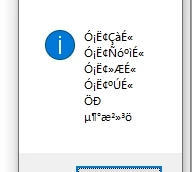


This topic has been closed for replies.
Correct answer Egor Chistyakov

Now filed as a bug report at UserVoice:

http://illustrator.uservoice.com/forums/908050/suggestions/48608555

4 replies

Egor Chistyakov
Egor ChistyakovCorrect answer
Inspiring
July 5, 2024
Sergey Osokin
Inspiring
November 22, 2023

I was wondering what is stored in the XMP of the document data. And as we can see on the screenshot, blue and orange plates with non-English names are also not added to the xmpTPg:PlateNames property. Read the Adobe XMP Specification about xmpTPg:PlateNames: "An ordered array of plate names that are needed to print the document (including any in contained documents)".


I don't associate this with the scripted inkList attribute. But I find that the problem is broader than scripts

Sergey Osokin
Inspiring
November 22, 2023

And here are the unnamed Global Color swatches when you open the .ai file with a code editor


[/Separation/Custom#20Green/DeviceCMYK<</C0[0.0 0.0 0.0 0.0]/C1[0.77 0.01 0.85 0.0]/Domain[0 1]/FunctionType 2/N 1.0/Range[0.0 1.0 0.0 1.0 0.0 1.0 0.0 1.0]>>]

[/Separation/Global#20Color/DeviceCMYK<</C0[0.0 0.0 0.0 0.0]/C1[1.0 0.01 0.0 0.17]/Domain[0 1]/FunctionType 2/N 1.0/Range[0.0 1.0 0.0 1.0 0.0 1.0 0.0 1.0]>>]

[/Separation/Global#20Color#202/DeviceCMYK<</C0[0.0 0.0 0.0 0.0]/C1[0.06 0.32 1.0 0.04]/Domain[0 1]/FunctionType 2/N 1.0/Range[0.0 1.0 0.0 1.0 0.0 1.0 0.0 1.0]>>]


And here are those swatch names in some Unicode encoding in DocumentCustomColors, which we also get in inkList


%%DocumentCustomColors: (Custom Green)
%%+ (Синий)
%%+ (オレンジ)


Aprking
AprkingAuthor
Inspiring
November 22, 2023

My friend, you are truly dedicated, and I am extremely grateful for your assistance. I have considered using Global Colors and their corresponding Spot Colors in the Swatches panel to obtain the correct Spot Color names.

However, I have discovered that if Spot Colors are deleted or new ones are added during the process, the Global Color names will increment as Global Color i+1. This makes it impossible to establish a complete correspondence between Spot Colors and Global Colors. Furthermore, when iterating through the Spot Color names in the Swatches panel, they are not sorted by creation time but rather by the Spot Color's name, rendering this method ineffective.

Well, it seems that resolving this issue is indeed impossible. Nevertheless, I still appreciate your help, my friend.

m1b
Community Expert
Community Expert
November 21, 2023

Hi @Aprking, it might be worth posting a demo file showing example ink names. So people can look into it further.

- Mark

Aprking
AprkingAuthor
Inspiring
November 21, 2023

@m1bThe information output by the above JSX script appears as garbled characters in versions of Illustrator running in Chinese, Japanese, and other non-English languages. Currently, I am not aware if the information output is abnormal in all other non-English language versions of Illustrator.

Sergey Osokin
Inspiring
November 21, 2023

I have checked the Cyrillic version of the interface. I confirm that inkList returns encoded names. I cannot yet determine which encoding is used.


[Ink Òðèàäíûé Ãîëóáîé],[Ink Òðèàäíûé Ïóðïóðíûé],[Ink Òðèàäíûé Æåëòûé],[Ink Òðèàäíûé ×åðíûé]

It should stand for

[Ink Триадный Голубой],[Ink Триадный Пурпурный],[Ink Триадный Желтый],[Ink Триадный Черный]


Sergey Osokin
Inspiring
November 21, 2023

This may be useless, but try the string 

var inkName = decodeURIComponent(ink.name);
Aprking
AprkingAuthor
Inspiring
November 21, 2023

@Sergey Osokin 

I have tried doing it myself, but I still got the same result which is garbled characters.

I suspect that ink.name does not support non-English language environments.

However, I still appreciate your response!