
Participant
December 11, 2020
Answered

how to merge all of the lines of one drawing

  • December 11, 2020
  • 4 replies
  • 1170 views

Hello! I am trying to merge the lines of a drawing using the pathfinder tool, but keep getting the message ''Please select two or more filled and overlapping paths merge''. It worked once but doesnt seem to be working for anything I draw now... 


I've attached a screenshot of the drawing I want to merge the lines of. 


thank you! 
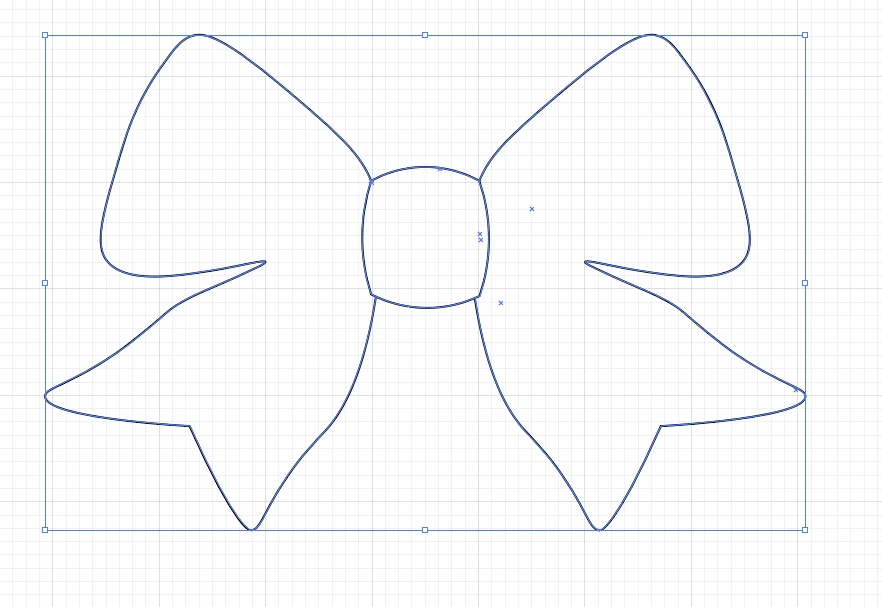


[ attachment inserted as inline image by moderator ]


This topic has been closed for replies.
Correct answer Monika Gause

Not sure what you mean by merge.

And also not sure what exactly you are doing - using the pathfinder panel or the pathfinder effects?


In any case: you should get to your desired result by using either the shapebuilder tool or live paint.

https://helpx.adobe.com/illustrator/using/creating-shapes-shape-builder-tool.html

4 replies

Just Shoot Me
Legend
December 12, 2020

In the future, So people don't have to download the image you have attached, please use the Insert Photos icon found in the Tool Bar of the Post and Reply text entry dialog window as pictured below.
Since you Can't Edit your original post to remove the Attached screen shot Please include the screen shot you attached to a new reply to this conversation by clicking the Blue Reply button under your original post and use the Insert Photos icon in the tool bar.
The Insert Photos icon is this one in the Tool Bar.


Thank you.

Participating Frequently
December 12, 2020

Hi,

I did use the insert Photo icon from the toolbar.


Just Shoot Me
Legend
December 12, 2020

@graphicsfactory 

My post was Not a reply to you. It was to the OP and anyone else reading this conversation on how to include a screen shot with their post.


If it had been a Direct Reply to you it would of been Nested directly under you reply and in a grey box like this reply is

Participating Frequently
December 11, 2020

This is what I do...


- Select all stroked paths you want to edit.

- Go to Object/Path/Outline Stroke

- Then go to the Pathfinder window and select Unite.

That will make them one filled shape.


Not sure if this is what you wanted, but it's one way 🙂


Monika Gause
Community Expert
Monika GauseCommunity ExpertCorrect answer
Community Expert
December 11, 2020

Not sure what you mean by merge.

And also not sure what exactly you are doing - using the pathfinder panel or the pathfinder effects?


In any case: you should get to your desired result by using either the shapebuilder tool or live paint.

https://helpx.adobe.com/illustrator/using/creating-shapes-shape-builder-tool.html

Peru Bob
Community Expert
Community Expert
December 11, 2020

This is the Using the Community forum (which is the forum for issues using the forums).
Please tell us what Adobe application you are using so that this can be moved to the proper forum for help.

Deblou123Author
Participant
December 11, 2020

Hello, thank you, its illustrator