
Inspiring
January 31, 2024
Answered

how to move precisely an object

  • January 31, 2024
  • 4 replies
  • 1265 views

Hello,

I would like to move an object close to another object.

I have found the solution to use the arrow keys, by setting them inside the preferences here, but I see that it is set to 1 px :  
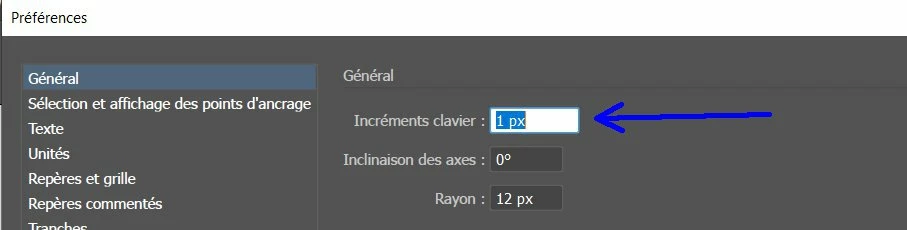


But 1 px is too much for me. Is it possible to set it as less than 1 px ? Or instead of using px, is it something other than px ?
This topic has been closed for replies.
Correct answer pierret18811376

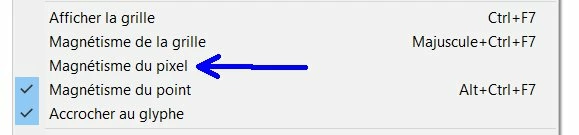
You might want to uncheck that.


I have just unchecked "snap to pixel", and I succeed now to apply the setting (from preference, ie : 0.1 px) to my graphic. And it is more easy for me to use arrow keys than move with the mouse.


4 replies

Inspiring
January 31, 2024

In the preferences, I have changed 1 px to 0.2 px, so it save it in preferences, but if I try to move my object, it is like if I had again 1 px. It should move of 0.2 px, but it is not the case.

Doug A Roberts
Community Expert
Community Expert
January 31, 2024

Is View > Snap to Pixel on?

Inspiring
January 31, 2024

It seems to be checked to snap to pixels :


It is by using the arrow keys that I can move only  of 1 px instead of 0.2 px.

But my object is very small (it is a line of 0.8 px  x  4.9 px).

CarlosCanto
Community Expert
Community Expert
January 31, 2024

you can change that to decimals, type 0.005 or anything you need (there are limitations on how small you can go)

CarlosCanto
Community Expert
Community Expert
January 31, 2024

you both beat me to it by a few seconds Lolll

Doug A Roberts
Community Expert
Community Expert
January 31, 2024

You can set it to less than 1px. Have you tried?

Jacob Bugge
Community Expert
Community Expert
January 31, 2024

Pierre,


You can just insert the value you wish in that box, and you can also set a different unit.


But you can also consider snapping, by using the Smart Guides; if you wish to have a specific distance, you can snap to the other object and then move the first object that specific distance away.