
nasirnanjee
New Participant
November 24, 2021
Question

How to remove overlapping lines on polar grids

  • November 24, 2021
  • 3 replies
  • 509 views

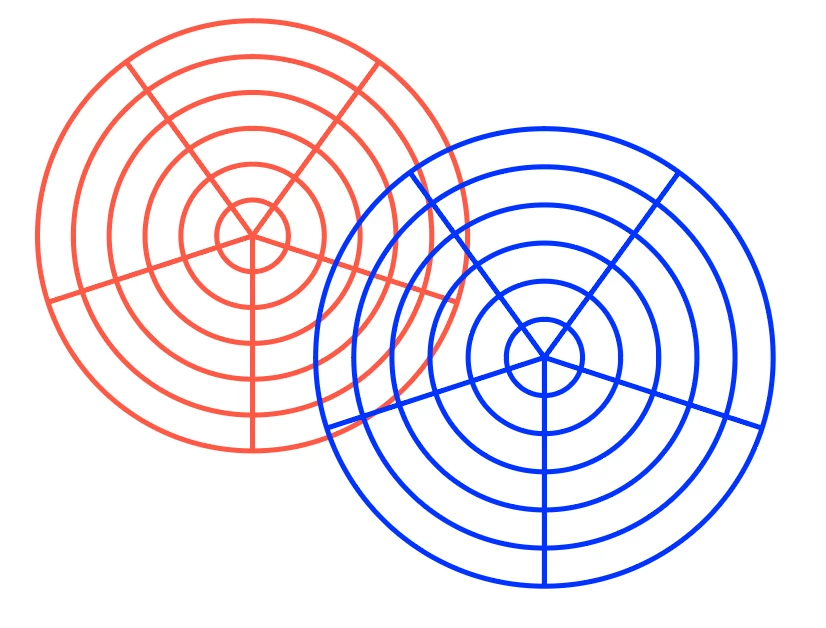
Hello! Noob here. How can I hide overlapping lines between two polar grids? Photo attached. For example, if I want to hide the red part of the polar grid which is underneath the blue part, but I want to keep the transparency of the inside of the grid instead of filling it white.
 

This topic has been closed for replies.

3 replies

Monika Gause
Community Expert
November 24, 2021

With the group selection tool select the outer ring of the blue grid.

Copy it.

With the selection tool select the red grid

Paste in front

Now apply a black fill to the circle and also change the stroke color to black. (black in this case can be the registration color - but be careful with that color in all other cases)

Select the red grid and the black circle and in the transparency panel make a mask.

Uncheck the Clip option in the transparency panel

Lukas Engqvist
Community Expert
November 24, 2021

Hiding things is usually done with a mask. You can make an additional circle over the two polar charts (same sixe as the outside of the stroke) and using the pathfinder you can end up with the shape of the blue chart you want to keep.


The shape above can hide those parts of the shape below, this is called masking. With the Moon shaped object shaped as the part of the grid you want to be seen above the Polar Grid, and the Polar grid selected (shift-click to select a second object without deselecting the first) you can Object > Clipping Mask > Create (cmd/ctrl-7).
There are plenty tutorials about creating clipping masks such as https://www.youtube.com/watch?v=cHoXTxN0x0s


barbara_a7746676
Community Expert
November 24, 2021

You could Oject > Lock the top blue grid. Then with the Eraser tool carefully erase the area of overlap on the red grid.