Inspiring
May 7, 2019
Question

How to reset Asset numbers in Asset Export Panel in Illustrator

  • May 7, 2019
  • 3 replies
  • 3801 views

hey guys, me again sorry

How do I reset the numerotation assigned to files in workflow exporter to a convenient 0

(I have 140 icon to export)

Thanks
{Renamed by MOD}

    3 replies

    Participant
    June 25, 2021

    Try creating a new document. Copy and paste the assets you want to export into your new document and the asset export panel numbering will begin at 1.

    Inspiring
    May 10, 2019

    Hi there,

    Remove the assets from the asset export panel. Close illustrator and start Illustrator again, and your numbers will have a fresh start.

    Good luck.

    Inspiring
    November 5, 2019

    Didn't work for me. I removed the assets, closed the file and Illustator. The asset numbering remembers values that are no longer there. Sweet ...

    Participant
    June 25, 2021

    Try creating a new document. Copy and paste the assets you want to export into your new document and the asset export panel numbering begins at 1.

    Srishti Bali
    Legend
    May 9, 2019

    Hi there,

    Thanks for reaching out. I am afraid, I did not understand your query due to the language issue. To help you with this issue we would need a few more details like:

    • To which format you are exporting?
    • What is the exact workflow you are following? Please share a small video if possible.
    • Which operating system and version of Illustrator you are working on?

    We’re here to help, just need more information.

    Regards,

    Srishti

    octone75Author
    Inspiring
    May 9, 2019

    Hello

    -> When trying to drag a vector icon (I just drawn) into the export workflow window to have these icons in png for example, Illustrator name it like : file 1, file 2, file 3    etc.

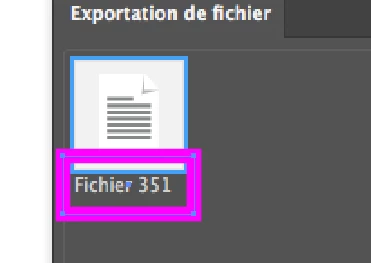
    -> after few added / removed icons( I have hundred of icons to export) files are named: file 351, file 352, file 353 etc.

    -> Each time I erase some icons and re-add ones, the number increase like : file 451, files 452 etc.

    -> I want to knw how I can reset the process, so I can drag icons into this window and have : file 1, file 2 etc… again, instead of : file 491, file 42, etc.etc.

         actually I'm doing this manually, but its time-consuming

    hope you'll understand, sorry for my awful english

    thanks in advance

    Srishti Bali
    Legend
    May 9, 2019

    Are you trying to export using Asset Export panel?

    I am afraid that there is no way we can reset this, however, it sounds like a great feature request. Would request if you can share this feature request here: Adobe Illustrator Feedback

    This is the best way of communicating with the Engineering and Product Management teams regarding issues and suggestions so they can be implemented in future releases.